


Windows 10 reached EOS (end of support) on October 14, 2025. If you are on Windows 10, see this article.

Pomoc pśepytaś

Glědajśo se wobšudy pomocy. Njenapominajomy was nigda, telefonowy numer zawołaś, SMS pósłaś abo wósobinske informacije pśeraźiś. Pšosym dajśo suspektnu aktiwitu z pomocu nastajenja „Znjewužywanje k wěsći daś“ k wěsći.

Dalšne informacije
Wócynjony

I am trying to enter new settings and can't locate the page

Michel T wótegronjony
tonia1

I used to have Thunderbird on this laptop and was using Microsoft Office 365. I have since stopped using it from GoDaddy. I uninstalled the old Thunderbird and reinstalled a new version. I am trying to enter the new server settings but I keep getting the old Office 365 settings showing up. How do I get rid of that and find the new settings page to enter the new settings?

All my old email accounts are showing up and I only want to add 2 to the new Thunderbird. I thought uninstalling would delete all the old stuff. Please help.

I used to have Thunderbird on this laptop and was using Microsoft Office 365. I have since stopped using it from GoDaddy. I uninstalled the old Thunderbird and reinstalled a new version. I am trying to enter the new server settings but I keep getting the old Office 365 settings showing up. How do I get rid of that and find the new settings page to enter the new settings? All my old email accounts are showing up and I only want to add 2 to the new Thunderbird. I thought uninstalling would delete all the old stuff. Please help.

Wšykne wótegrona (1)

I'm not sure I understood what you want.

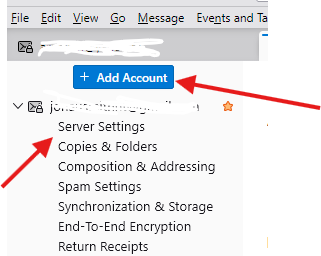
If you want to add 2 new email accounts then : - Right click on any email account - And click on Settngs - Look at the top of the Settings, you should see a blue button "Add Account"

If you want to change the server settings of an existing account then - Right click on that email account and click on Settings - Click on Server Settings
Stajśo pšašanje

Musyśo se pla swójogo konta pśizjawiś, aby na pśinoski wótegronił. Pšosym stajśo pšašanje, jolic hyšći njamaśo wužywaŕske konto.