


Address Bar Not Retracting
Hello,
After updating to,
150.0 (Build #2016155439), 1a6c5c6f11fca486436075d92fd82d51f706c775 GV: 150.0-20260415192539 AS: 150.0.1 OS: Android 15
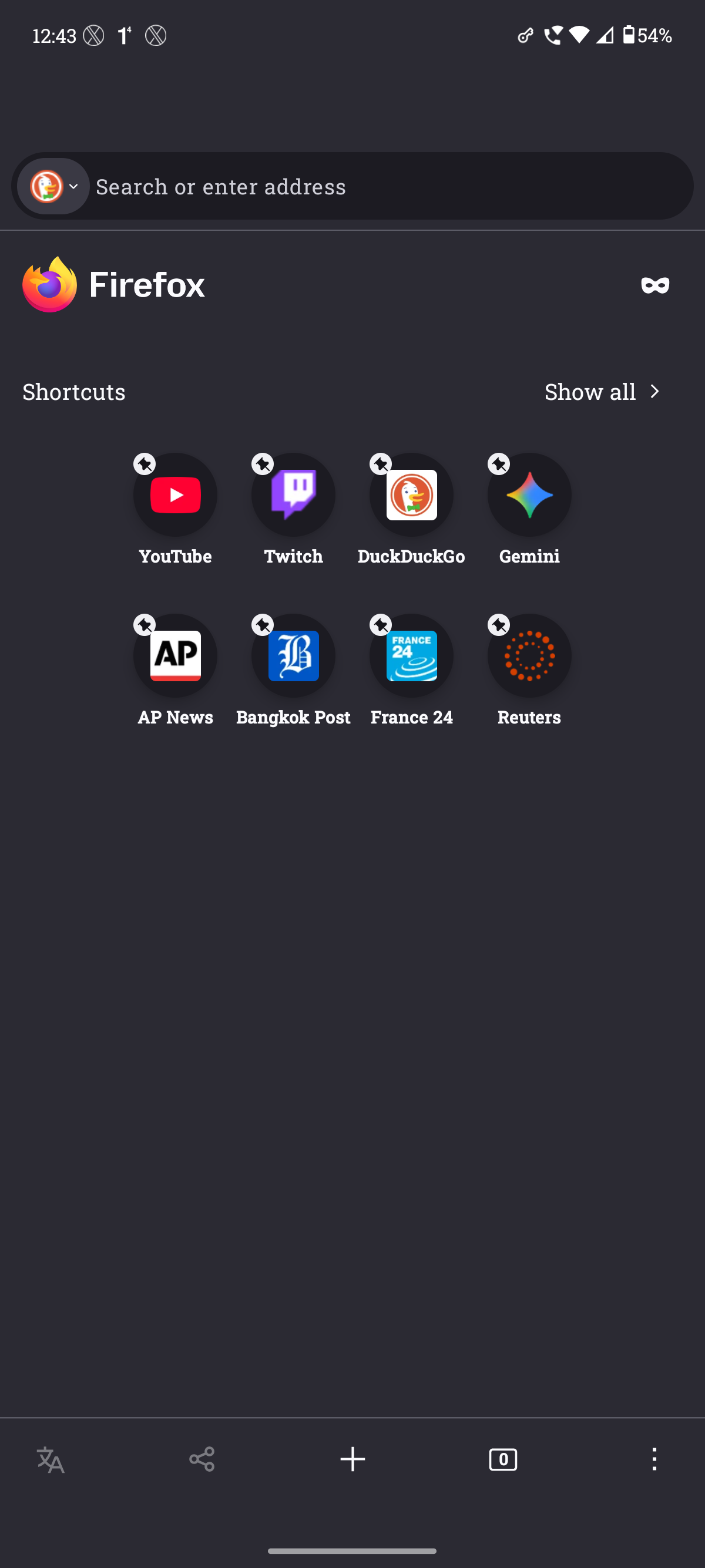
I have been having issues with the address on top of my phone (Motorola Edge 50 Neo).
As you can see, as soon as I switch from Private Browsing to Normal Browsing, the address bar on the top shifts and never goes back to its original position.
It only resets back to its position when I close the App and open Firefox again but the issue persists whenever I try to switch from Private browsing to Normal browsing (vice-versa).

Wšykne wótegrona (4)
Hi,
Could you please file a bug on Bugzilla with this info and the exact steps you perform, for the developers to take a look? Please also share a link to it here.
Hello Denys,
Thanks for reaching out. I've filed the bug on Bugzilla. Below is the link https://bugzilla.mozilla.org/show_bug.cgi?id=2034057
Wót imakilluhoe změnjony
Thank you! I've moved the bug to a better component. Could you please also clarify how exactly you switch to the private browsing? (There are several different ways)
I mostly press the Private Browsing icon on the Homepage and sometimes use the Tab Button to switch from Normal to Private Browsing (vice-versa). In both the methods the same issue persists after switching.