


THUNDERBIRD : e-mail file won't delete

• OS Version: Microsoft Windows 10 Professional (x64) Version 22H2 (build 19045.6466) • Firefox 148.0.2 (64-bit) • Thunderbird 140.8.1esr (64-bit)
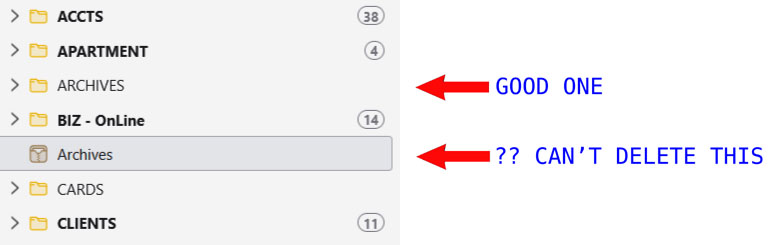
In my email files (left pane) I have an ARCHIVE file (the good one), but also a second one (the one I can't delete); please see image attached.
Note the second one has a grayed-out icon which is different from the good ones. How can I send that file off to OblivionWorld?
Thank you. Appreciated. Nels
Wšykne wótegrona (2)
Wubrane rozwězanje
Lets start with some nomenclature so we do not end up at odds. Communication requires everyone to understand what is being discussed and correct terminology is important in clarifying exactly what is intended.
The things you are referring to are called folders primarily because they contain individual "things" The file system uses the same terminology for essentially the same organizational items, except in the case of the file system folders do indeed contain files as well as other folders. In Thunderbird they contain other folders or emails, if they contain anything at all. But they do not contain files.
The next important issue is the icon on the folder. It is not a "standard" card file icon. So the folder has a special designation of some sort.
This image is basically a standard local folders icon "set" for an account. (in this case mine)
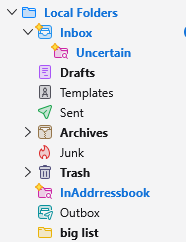
See the archive folder shown has the same icon as the one you label as "wrong". That is the standard icon for a folder that is configured in account settings as the archive folder for the account.
SO that folder is set in Account settings > [Email account name]> Copies and folder to that account.
Here is an example, again taken from my Thunderbird.
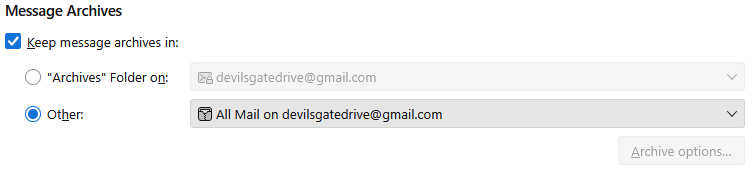
So you have configured something to be your account as archive, or it has been flagged that way by your IMAP mail server. This image only tells part of the story as it does not offer any clues as to the account being IMAP or POP. I am assuming IMAP as that is the default but I am not going to write instuctions for anything without knowing which it is for.
Select both of those folders individually and right click them and select properties. WHat is the location given in both instances.
You can highlight the content of the location text box with your mouse and press Ctrl+C and then paste that information into your reply on this forum using Ctrl+V. In makes the problems that come with trying to manually copy much less.
The email address I posted the archive setting for shown imap://devilsgatedrive%40gmail.com@imap.gmail.com/All Mail from my perspective that confirms the type of account being used and the "real" folder name that the mail server calls that folder. Which is not necessarily what Thunderbird shown after some recent helpful meddling by developers.
Correcting the account setting should be all that is required. But I would really like to know what the corrected names for each of those folder are before suggesting you try and change anything. It got this way for a reason. If you did not set it this way, then I feel the why might be very important to make a lasting change. But the only real difference in your wrong and correct is the case of the text used. Most mail servers use Linux and Linux sees case as making a different word. Windows would see Archive ARCHIVE and archive as three of the same thing. Linux sees that as three separate items with three distinct manes so I think we need to establish the exact details of the why before any attempt is made to correct anything.
Thank you - Decided the path of least resistance and effort: Merely moved files from the folder I had created into the one I had labeled as "can't delete this one" . . . and deleted the folder I had created. Life goes on.
Thank you.