


149.0b1 - userChrome.css settings for message-list colors stopped working

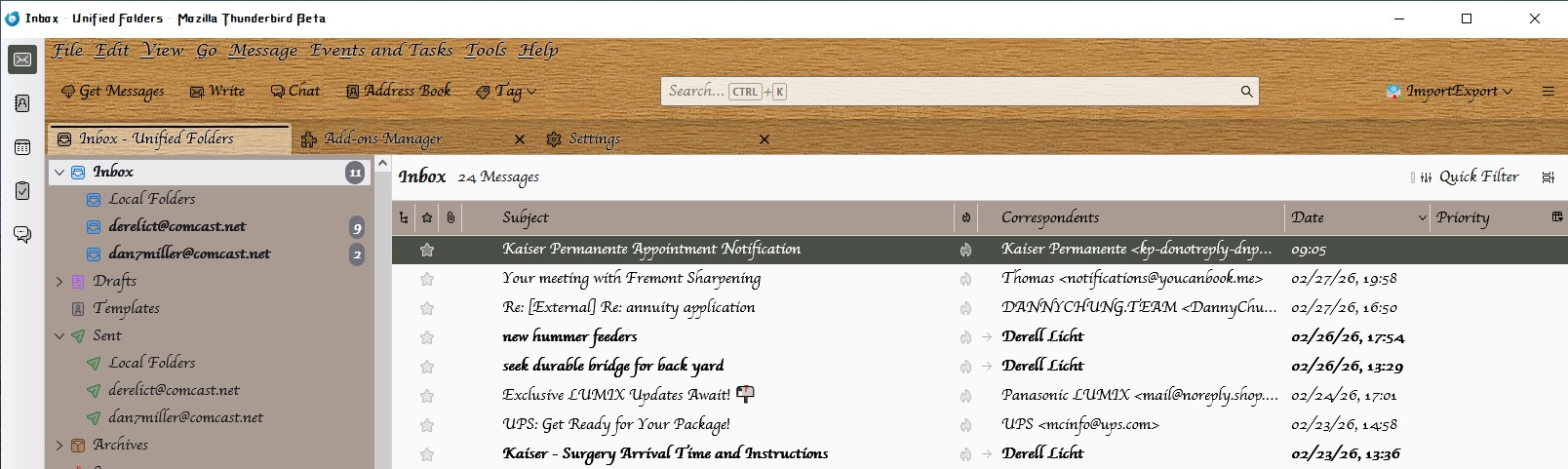
I've been using color settings in userChrome.css to set the colors for the threads and folder panes... I obtained these settings from a discussion in the Thunderbird Beta mailing list, back in 2023. Here are my current settings:
- root {
 /* Force BG in unthemed folder */
 --foldertree-background: #A99B92 !important;
 /* Force BG in threads */
 --tree-view-bg: #A99B92 !important;
 /* Force black text in threads */
 --tree-view-color: #000 !important;
} /* Position Menu Bar above Unified Toolbar */
- toolbar-menubar { order: -1 !important;}
However, after the most recent beta update, the tree-view settings are no longer working, and I'm stuck once again with the ghastly Bright White background... see the attached image; note that the foldertree setting is still working though...
What do I need to do, to get this code working again? or is this a bug in the current beta?
Wubrane rozwězanje
Okay, nevermind... I'm just using obsolete syntax. I found a discussion over on elevenforum.com, that provided working code for me...
https://www.elevenforum.com/t/thunderbird-115-css-customization.16320/page-21
Toś to wótegrono w konteksće cytaś 👍 0Wšykne wótegrona (1)
Wubrane rozwězanje
Okay, nevermind... I'm just using obsolete syntax. I found a discussion over on elevenforum.com, that provided working code for me...
https://www.elevenforum.com/t/thunderbird-115-css-customization.16320/page-21