


File (saving) to a folder - Recent function
The File (saving to a folder) Recent function used to have the folders alphabetically. Some genius thought to reorganize the Recent folders to be in chronological order. Is there a setting to have the Recent folders be in alphabetical order again? I could not find anything. Thanks in advance.
Wšykne wótegrona (12)
Just a possibility if this is ver 146 you're using: - try highlighting the account - rightclick and select 'reset folder order.'
I am assuming the account with the folders not alphabetical. Or Local Folders.

Paul said
The File (saving to a folder) Recent function used to have the folders alphabetically. Some genius thought to reorganize the Recent folders to be in chronological order. Is there a setting to have the Recent folders be in alphabetical order again? I could not find anything. Thanks in advance.
Paul, where is this function in Thunderbird? Are you using an add-on? Or is this a function in a file dialogue window from the operating system?
Sorry, been away for a while. When you open an email you receive, it's the File in the second row with the down arrow; when clicked, there is Recent and Local Folders. See image. When you click in the >, that opens up the folders.
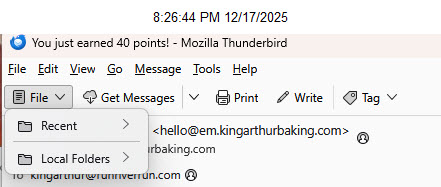
Thanks. I don't use that view and I would not see "File" there if I did because I removed it from that toolbar. So I did not know what you were referring to.
On the unified toolbar, the same button is called "Move to". Consistency might be helpful.
I cannot reproduce the problem. What version of Thunderbird are your using?
A general troubleshooting step may be helpful. Could you start Windows in safe mode with networking, then open Thunderbird in troubleshooting mode (Help menu), and see if the problem persists?
Hi Rick, you replied right after I shut down my computer for the night. I'm using the most recent version - 146.0.1. I pretty sure this issue started with the most recent version update just a few days ago. Having used Thunderbird for decades, this feature was always alphabetical. My sense is some programmer overthought the issue and decided to change it. Normally this is due to the programmer not really using the feature but think they are being clever/helpful when they aren't.
I'll try to start in Safe mode now and let you know. Thanks again for your time helping on this.
There was a conscious decision to make changes to folder names in 146. Apparently not well thought out. Several users have reported displeasure with results. There are bugs in progress, as I understand, so I anticipate some upcoming changes. On that, as a volunteer, I speak only as an outsider; we're not part of the 'in crowd.'
I hope they monitor these forums. I have not found anyway to send bugs/requests. They broke the Save address button next to the sender's email address a while ago which eventually was fixed, but the Edit Details is still broken. I assume they know but there is no way for sure.
Thanks again for your suggestions and time. Take care.
The place to file bug reports is https://bugzilla.mozilla.org/home The place to make recommendations is connect.mozilla.org under the IDEAS page. Those are read (or so I'm told).