


Firefox tabs don't get saved when closing Firefox - Version 145.0

Firefox version 145.0 in Linux Ubuntu 22.04.5 LTS. When I open Firefox all tabs from previous session are gone. On "Startup" I have checked "Open previous windows and tabs". Which worked before but not now. It is very frustrating. How do I fix? The Profile Manager opens the settings and "Open previous windows and tabs" is checked. Checking "ask before closing multiple tabs" doesn't help.
Wubrane rozwězanje
Thanks to jscherr2000 and jonzn4SUSE for all the help. With your help I've learned a bit about Firefox. Something must be left open when I close Firefox. Or maybe it closed for some unknown reason. Not sure exactly. I did a system reboot, chose the original profile and Firefox began working properly again. Not sure exactly why and it's a PITA to do a system reboot but at least this solved the problem. It is actually the second time for this event. I'll try to pay more attention in future and hopefully realize exactly what went wrong. At least now I don't feel compelled to change browsers. Thanks again, chocomo99
Toś to wótegrono w konteksće cytaś 👍 0Wšykne wótegrona (9)

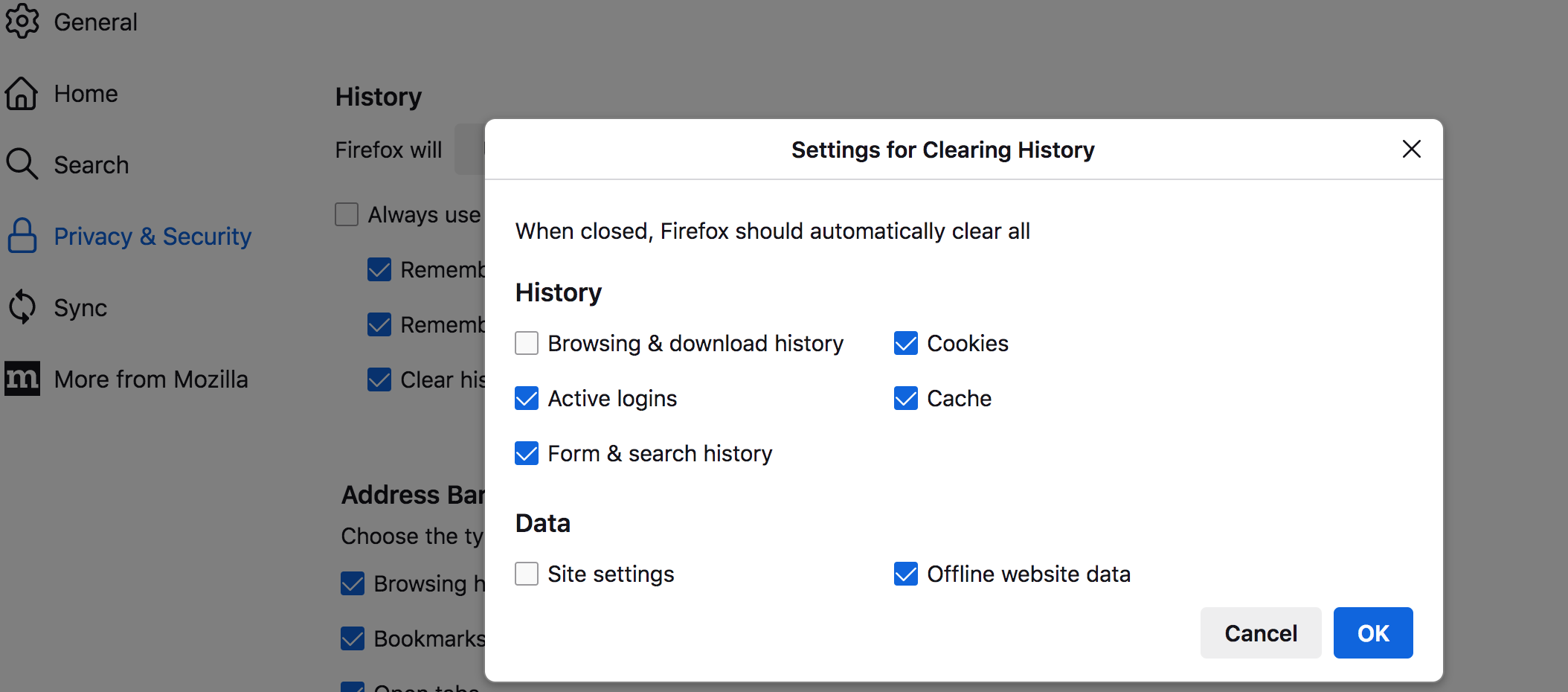
It's either the settings or the usual session restore failure. What are your privacy settings when Firefox closes? see screenshot
jonzn, Thanks for the reply. I believe I checked the box that said email me when someone responds. Well that didn't work either. I just looked on the forum and saw your answer. Unfortunately, my version of Firefox doesn't appear the same as yours and I am unable to see the same popup windows. Nor am I able to see any of the popup windows from any of the other answers to my previous (same) question when I had version 143.0. I've tried various settings all to no avail... In all cases I've checked the box "open previous windows and tabs" on startup. Other settings must override that one. That's what I would call sloppy coding on the developer side. Or maybe I'm just suffering "the usual session restore failure" as you suggest. Maybe it's time to try a different browser. Hopefully that will end my frustration.
Can you restore any missing windows using the History menu?
- "3-bar" menu button > History > Restore Previous Session
- (menu bar) History > Restore Previous Session
If those are missing or grayed, check either:
- "3-bar" menu button > History > Recently Closed Windows
- (menu bar) History > Recently Closed Windows
If you don't have any windows to restore, what are your history settings? This is on
Settings > Privacy & Security > History
(1) Firefox will: Remember history
Normally, this allows full session restore.
(2) Firefox will: Never remember history
This invokes automatic private browsing, so no sessions can be restored.
(3) Firefox will: Use custom settings for history
We need to dive into the details:
- Make sure "Always use private browsing mode" is NOT checked
- Make sure "Remember browsing and download history" IS checked
- If "Clear history when Firefox closes" is checked, click the "Settings" button to the right to review the categories set to be cleared at shutdown. Make sure "Browsing & download history" is NOT checked
Assuming all that checks out, hmm, is Firefox shutting down fully -- do you quit Firefox using the Quit item on the menu?
Thanks for reply. This time I got an email alert. I've posted a pic menu->history... As you can see "Restore Previous Session" is not there. Same with the 3-bar->history. "Recently Closed Windows" doesn't save open tabs when a session is closed. Also posted a pic of 3-bar->settings->history. I use custom history settings and have checked the appropriate boxes. This should be same as "Remember History" I will also try what you suggest... These settings work during a session but it does not specify that is works for "Restore Previous Session". If this overrides/conflicts with General->Startup->"Open Previous Windows and Tabs" then developers need to fix...
I usually quit Firefox by clicking the X (Close) in the upper right corner. Have been doing it this way for many years. I could try the menu method but the recent versions of Firefox hide the menu to save space. It now requires a keystroke to open the menu bar.
Hopefully I've answered all your questions.
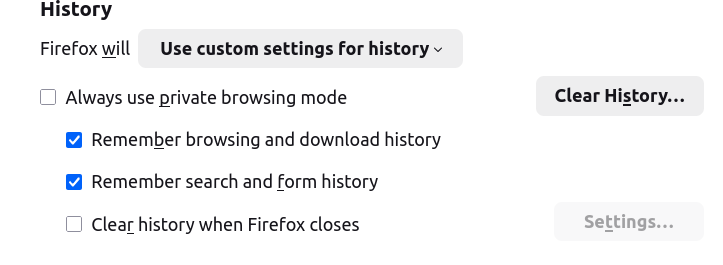
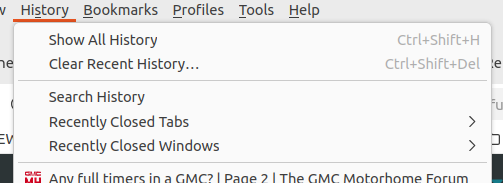
Thanks, your history settings look good.
Could you check Firefox View -- either
- click the "file drawer" icon at the left end of the tab bar
- type or paste about:firefoxview in the address bar and press Enter to load it
-- then click Open Tabs in the left column. Firefox should display a box for each open window with the beginning of a list of tabs. Are there any boxes for non-visible windows? Non-visible windows could be off screen due to having irrational left/top coordinators or due to being on a different Windows desktop.
Either way, if you close visible windows using X but there is a non-visible window open somewhere, Firefox will not end your session and when you click the shortcut you will get a new window in the same session. But in that situation, History > Recently Closed Windows should list the last 3 windows you closed using X so you can reopen them.
If we have ruled out:
- Firefox dumped history
- Firefox did not actually quit
Then my suspicion would that there is some privacy/cleaning software running on your system that removes Firefox data between sessions or at Windows startup (something like CCleaner or Advanced System Care).
Another possibility is that Firefox has a problem with writing/updating session history files due to a file lock or permission issue. If your other data all remains intact this seems less likely, but I can describe some steps to try in that case.
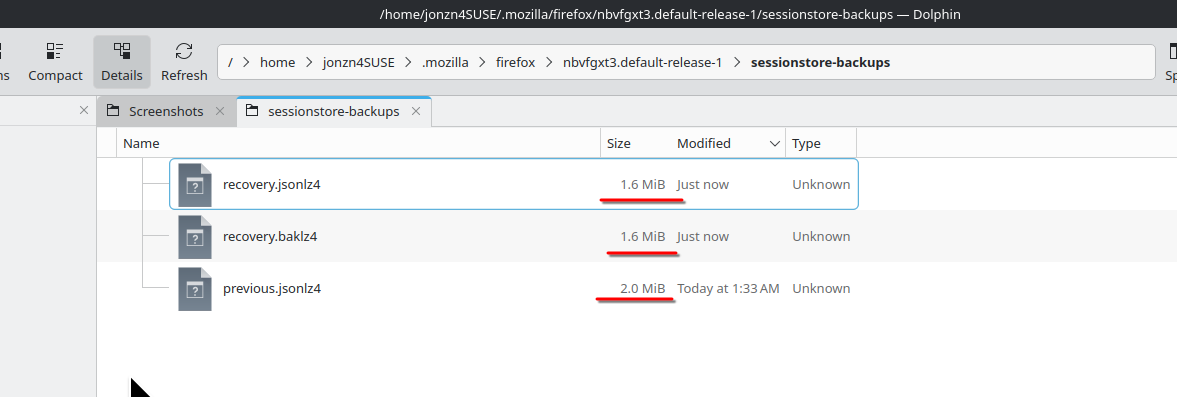
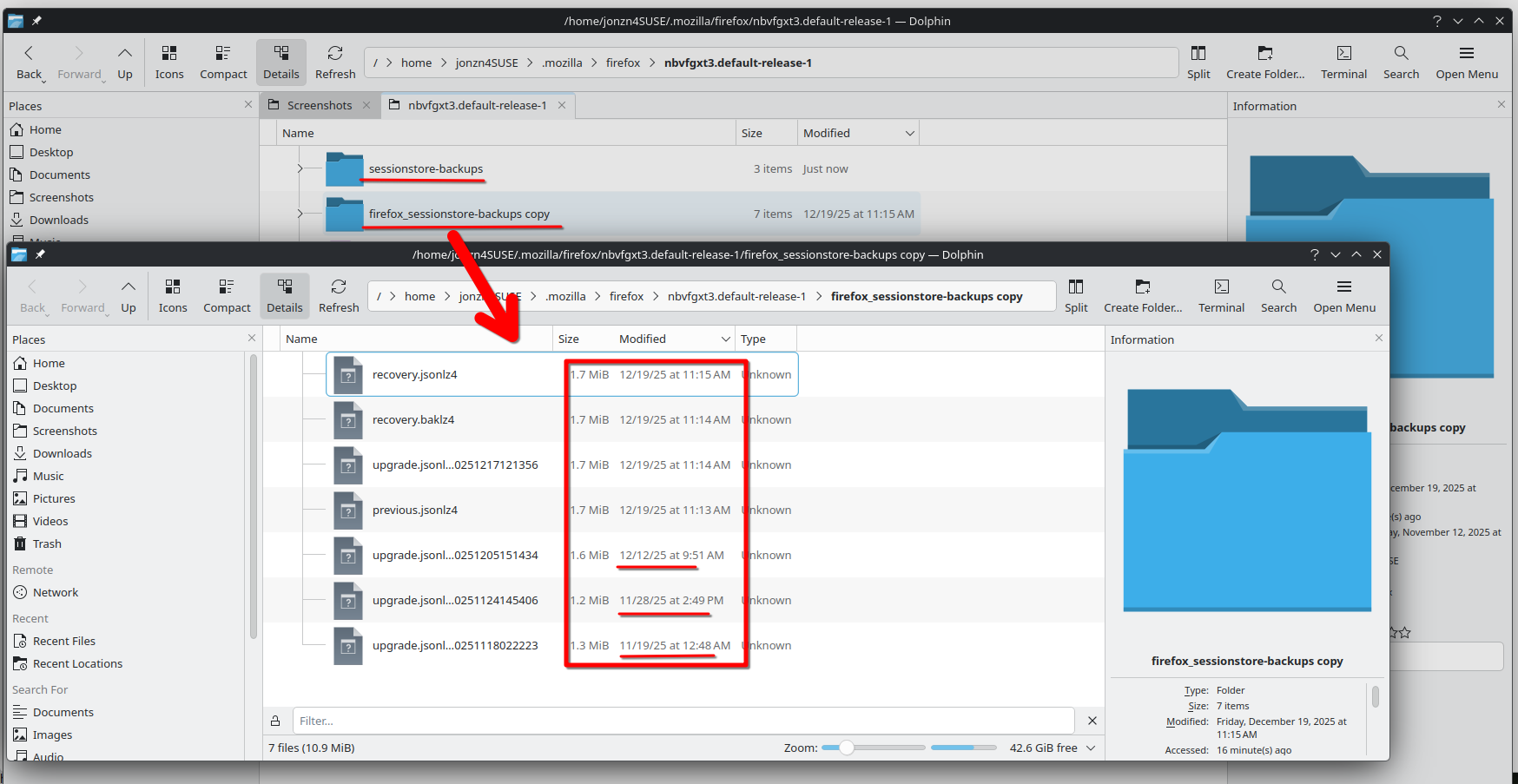
Post a similar screenshot of the files in your sessionstore-backups folder in your profile folder. see screenshot of mine. You can see the size of the files. I have around 10 windows and a ton of tabs in each. What did you have open? When the files size is in the KB range, that's a good indication that the session has been lost. Which is why I make a copy of the sessionstore-backups folder. see screenshot I can go back in time.
Wót jonzn4SUSE změnjony
I am responding to 2 posts with 1 reply.
JScher2000, I opened the file drawer as you advised. I've occasionally wondered what that icon was for. Anyway by default "Open Tabs" sorts by recent activity. There were two columns: Column 1. Labeled "Window 2 (current)" which lists my current tabs. Column 2. Labeled "Window 1" which lists some older tabs that were open ~when this problem started. I'm not sure what this means. Would rebooting the computer solve this problem?
BTW I'm running Linux.
jonzn4SUSE, If you look at the posted pic you can see the dates are August 2022. This makes no sense to me. They are also in the KB range. I notice that your files are very recent. Maybe you can interpret.

If you click a tab in Table 1, what happens? Does it come on screen or does Firefox give any other indication that it thinks it is showing that tab?
Wubrane rozwězanje
Thanks to jscherr2000 and jonzn4SUSE for all the help. With your help I've learned a bit about Firefox. Something must be left open when I close Firefox. Or maybe it closed for some unknown reason. Not sure exactly. I did a system reboot, chose the original profile and Firefox began working properly again. Not sure exactly why and it's a PITA to do a system reboot but at least this solved the problem. It is actually the second time for this event. I'll try to pay more attention in future and hopefully realize exactly what went wrong. At least now I don't feel compelled to change browsers. Thanks again, chocomo99