


I get frequent errors that "connection to server pop.xxx.net.il was reset." but at the same time, TB does download my messages

A search showed that others have experienced this same error message, but as far as I can tell, they all were unable to access their email. These messages began appearing about a month ago. They pop up in Troubleshooting Mode. They did not in Windows Safe Mode. AVG and ZoneAlarm are not the culprits.
Wót Wayne Mery změnjony
Wšykne wótegrona (8)
Can it be that in this great, big TB community that not even one person has any ideas?!
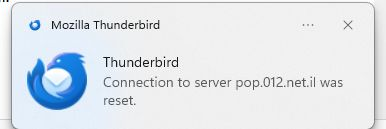
Thanks. Please also always state your full Thunderbird version number. If it is ESR 140, then the cause is unlikely to be Thunderbird.

They did not in Windows Safe Mode. AVG and ZoneAlarm are not the culprits.
Windows safe mode disables anti-virus software. If the problem doesn't occur in Windows safe mode, this strongly suggests that anti-virus software is involved.
These are some generic suggestions to avoid problems with anti-virus software.
Create an exception in your anti-virus software for the Thunderbird profile folder, so that the anti-virus real-time scanner will not scan it. https://support.mozilla.org/en-US/kb/profiles-where-thunderbird-stores-user-data#w_how-to-find-your-profile
Don't let your anti-virus software scan incoming and outgoing messages.
Don't let your anti-virus software scan attachments.
Don't let your anti-virus software intercept your secure connection to the server.
Remove any add-ons your anti-virus software may have installed in Thunderbird.
Keep it working. https://kb.mozillazine.org/Keep_it_working_-_Thunderbird
And last but not least, backup your Thunderbird profile on a regular basis. https://support.mozilla.org/kb/profiles-where-thunderbird-stores-user-data#w_backing-up-a-profile
Wrt Zone Alarm firewall - what is this good for? Windows has a built-in firewall, and there is absolutely no need for any 3rd-party firewall solution.
Thank you for your reply. I ruled out AVG because I disabled it temporarily and the error messages kept on coming. ZoneAlarm: I've been using the free version since long before Windows added a firewall. I trust it, so why switch?