


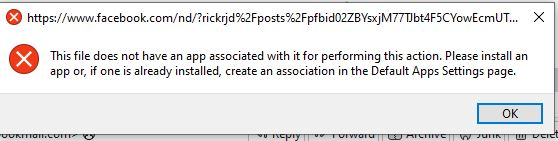
When I click on a link in a TB email message it says "This file does not have an app associated with it..."

I have an e-mail in my TB in-box. The mail contains a hyperlink to Facebook. When I click on the hyperlink, I get the message copied above in the Subject of this problem. In almost all cases, if I re-click on the icon in the e-mail, the re-click takes me to the desired URL in Firefox. My Thunderbird is 128.11.1esr (64-bit). Why is the first click producing the error message? Would there be anything in the TB Error Console?
Wšykne wótegrona (10)

Does that happen with all links, just that one, or with other FB links as well?
>Would there be anything in the TB Error Console?
Are you asking before you open it, or did you mean 'should there be anything' because you looked and nothing relevant was there?
IIRC, I have seen this only for Facebook links. My comment about the Error Console is a basic question about error debugging. Twice I have looked in the Error Console and found nothing, but TB might have downloaded new mail between the time of the error message and my looking at the Error Console, so all the info about the newly downloaded messages are at the bottom of the Console, and any error message about my problem would be earlier in the Console.
Open the console > click the trash can upper left corner to clear it out. Then try a FB link.
I still have the problem, and it has occurred on non-Facebook links. There is nothing in the error console. It is not a major problem, as a second click usually get me to the URL in question.
bsfinkel said
I still have the problem, and it has occurred on non-Facebook links. There is nothing in the error console. It is not a major problem, as a second click usually get me to the URL in question.
Odd. Does that also happen in Troubleshoot mode (https://support.mozilla.org/en-US/kb/safe-mode-thunderbird)? If so, you could try a new profile (https://support.mozilla.org/en-US/kb/profile-manager-create-and-remove-thunderbird-profiles).
Wót Ed změnjony
I do not know what extensions and/or themes I have installed in TB. Is there a way to determine this?
bsfinkel said
I do not know what extensions and/or themes I have installed in TB. Is there a way to determine this?
You didn't answer if it also happens in Troubleshoot mode. If it does, then an add-on isn't causing it.
TB menu > Add-ons and Themes
FF menu > Extensions and themes
I have been busy with other problems, so I have not had time to experiment with Troubleshoot Mode. And the problem occurs very infrequently, so it might not occur even in Troubleshoot Mode
In OS, please check you have set up your preferred browser as default - eg: Firefox
For Windows 11, Settings > Apps > Default apps
In OS, please make sure the 'default file types or link types' are set up correctly
.htm, .html, HTTP, HTTPS - all of these should be set to use the default browser eg: Firefox
Firefox is my default browser. .htm and .html point to Firefox. HTTP and HTTPS point to Firefox in "Choose default apps by file protocol"
I thought that computer actions were repeatable. I can understand clicking on a hyperlink in an e-mail and always getting the error message, but I do not understand getting the error message on one click and then not getting the message on the next (identical) click.