


Windows 10 reached EOS (end of support) on October 14, 2025. If you are on Windows 10, see this article.

Pomoc pśepytaś

Glědajśo se wobšudy pomocy. Njenapominajomy was nigda, telefonowy numer zawołaś, SMS pósłaś abo wósobinske informacije pśeraźiś. Pšosym dajśo suspektnu aktiwitu z pomocu nastajenja „Znjewužywanje k wěsći daś“ k wěsći.

Dalšne informacije
Toś ta nitka jo se archiwěrowała. Pšosym stajśo nowe pšašanje, joli trjebaśo pomoc.
Rozwězany Archiwěrowany

Thunderbird 102.6.1 inbox message background/forground color impossible to read.

smfabac wótegronjony
smfabac

I've been plagued with incoming messages that use a foreground/background color combination too dark to read without forwarding the message and then applying white to the swept text. The uploaded image shows the progression of reading the message, sweeping the text in the message (still uncomfortably dark with low contrast), forwarding the message (still unreadable), then select the text and apply white as the text color. I've googled this problem to no avail as most hits are for color contrast in the inbox format for color.

One solution is to switch themes from "dark" or "system theme - auto" to "light" then Thunderbird switches to black text on a white background and the incoming message is readable.

Is there a setting I'm missing to automatically solve this without having to swap theme's to read a message then swap back to preferred dark mode?
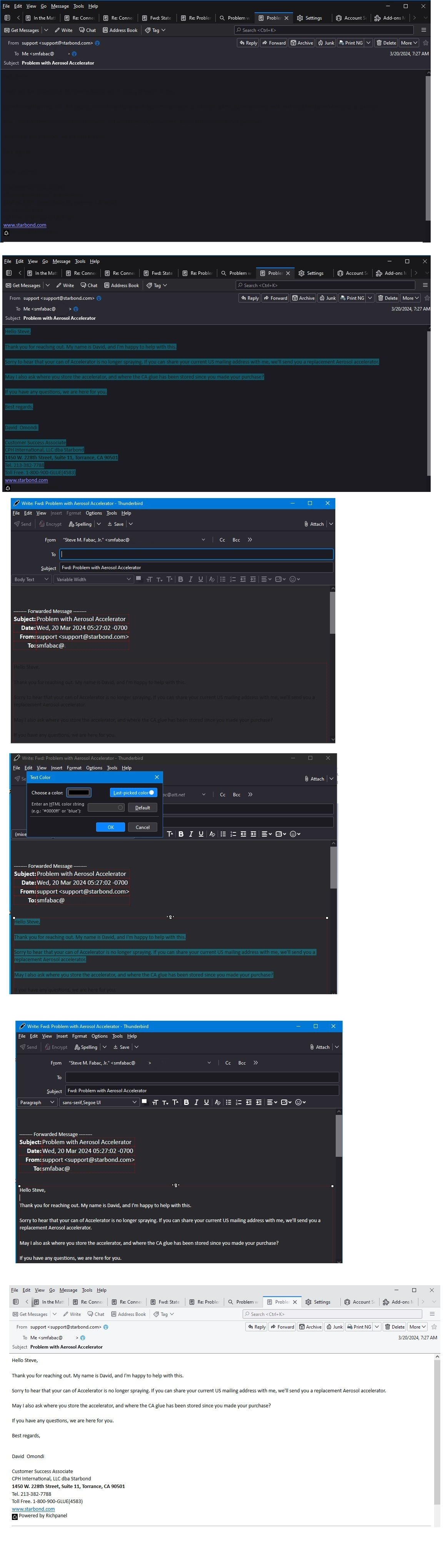
I've been plagued with incoming messages that use a foreground/background color combination too dark to read without forwarding the message and then applying white to the swept text. The uploaded image shows the progression of reading the message, sweeping the text in the message (still uncomfortably dark with low contrast), forwarding the message (still unreadable), then select the text and apply white as the text color. I've googled this problem to no avail as most hits are for color contrast in the inbox format for color. One solution is to switch themes from "dark" or "system theme - auto" to "light" then Thunderbird switches to black text on a white background and the incoming message is readable. Is there a setting I'm missing to automatically solve this without having to swap theme's to read a message then swap back to preferred dark mode?
Pśipowjesone fota wobrazowki

Wót smfabac změnjony

Wšykne wótegrona (2)

click view>message body as > plain text or simple html If this happens frequently, there is an addon, toggleHTML, that may simplify the process.

Wubrane rozwězanje

Thanks David, your suggestion solves the problem with the subject email and it is easy to toggle back to standard HTML after responding to the email.