Windows 10 reached EOS (end of support) on October 14, 2025. If you are on Windows 10, see this article.

Pomoc pśepytaś

Glědajśo se wobšudy pomocy. Njenapominajomy was nigda, telefonowy numer zawołaś, SMS pósłaś abo wósobinske informacije pśeraźiś. Pšosym dajśo suspektnu aktiwitu z pomocu nastajenja „Znjewužywanje k wěsći daś“ k wěsći.

Dalšne informacije
Toś ta nitka jo se archiwěrowała. Pšosym stajśo nowe pšašanje, joli trjebaśo pomoc.
Archiwěrowany

Thunderbird occasionally stops showing folders

madanra wótegronjony
madanra

I access my email via IMAP. The IMAP server runs Dovecot.

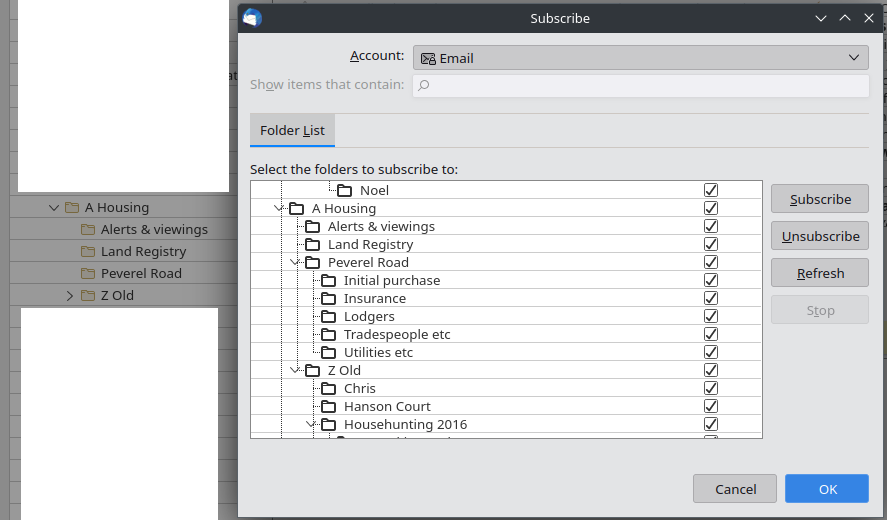
Occasionally, Thunderbird stops showing some of my folders. The folders are still shown in the subscriptions settings, and are still subscribed to, but are not showing in the folder pane. Often, unsubscribing, restarting Thunderbird, resubscribing, and restarting Thunderbird works, and the folders reappear, but sometimes that is insufficient. As has happened today.

The folder Peverel Road and all its subfolders disappeared; unsubscribing and resubscribing brought back the Peverel Road folder, but not its subfolders.

View -> Folders is set to All.

Advanced account settings is set to *not* "Show only subscribed folders".
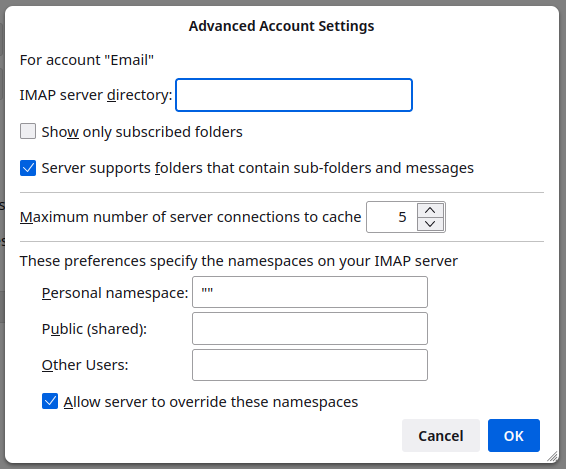
I access my email via IMAP. The IMAP server runs Dovecot. Occasionally, Thunderbird stops showing some of my folders. The folders are still shown in the subscriptions settings, and are still subscribed to, but are not showing in the folder pane. Often, unsubscribing, restarting Thunderbird, resubscribing, and restarting Thunderbird works, and the folders reappear, but sometimes that is insufficient. As has happened today. The folder Peverel Road and all its subfolders disappeared; unsubscribing and resubscribing brought back the Peverel Road folder, but not its subfolders. View -> Folders is set to All. Advanced account settings is set to *not* "Show only subscribed folders".
Pśipowjesone fota wobrazowki

Wšykne wótegrona (1)

Enabling "Show only subscribed folders" & restarting Thunderbird made the folders reappear this time. I then disabled it again and restarted Thunderbird, and the folders have remained.

Well, I now have one more tool in my toolbox for next time this happens...