


after update to 104.2.0 Cardbook icon not in spaces toolbar

The icons for the addons I have installed do not appear in the spaces toolbar - is that as expected? the icon for cardbook is on RHS - how do I get it on to the spaces toolbar on the LHS? Suggestions please
Wšykne wótegrona (5)
It does appear in the toolbar here in TB 102.4/W10 and Cardbook 82.9 (see picture). Do you have the latest version?
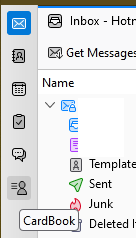
Thanks sfhowes
Cardbook is up to date
These pictures show where the icon is (and isn't)


You could try launching in safe/troubleshoot mode (hold Shift when launching TB), 'Reset toolbars & controls', 'Make changes & restart', or disable and re-enable Cardbook, or re-install Cardbook.
Thanks - I will try that
Version 83.0 Released Oct. 19, 2022 1.1 MiB Works with Thunderbird 102.0a1 - 102.* - fix for importing Thunderbird standard address book - fix for the spaces icons