


Removing an email account
I would like to remove a discontinued e-mail account from my Thunderbird account, but I cannot find how to do that. It is the account I initially established my Thunderbird client with, so maybe that is a problem. However, I do have other email accounts I access via Thunderbird. Anyone have suggestions? (Thanks for thinking on it.) ... Nick
Wubrane rozwězanje
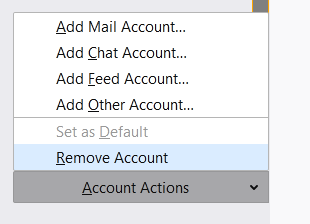
You should see Account Actions in Account Settings (see picture). In case the layout is broken, launch TB in safe mode (hold Shift when starting TB) and see if Account Actions is visible.
Wšykne wótegrona (5)
Open Tools/Account Settings. If the account you want to remove is at the top of the left pane, it is the Default and cannot be removed. Select another account, then Account Actions (bottom of left pane), Set as Default, then select the account you want to remove, Account Actions, Remove Account.
I have now another e-mail account as default. However, when I select the e-mail account I want to remove, there is no Account Actions option at the bottom of the bottom of the left (list of e-mail accounts and boxes) pane, and no such option either when I open the Account Settings for the to-be-removed e-mail account. On that latter window on the lower right, there is a Manage Identities button--but it has no option for removing the e-mail account either.
Wubrane rozwězanje
You should see Account Actions in Account Settings (see picture). In case the layout is broken, launch TB in safe mode (hold Shift when starting TB) and see if Account Actions is visible.
Thank you, sfhowes, for persisting with me. Great to learn more about the system! Good wishes ... Nick