


Need to get mail filters from old mac to new mac
I cannot find a way to export mail filters from my old mac to new mac. Somehow all my folders made it over, guessing due to IMAP, but my contacts and filters did not. Contacts I was able to export/import - but filters I cannot figure out for the mac. Thanks!
Wubrane rozwězanje
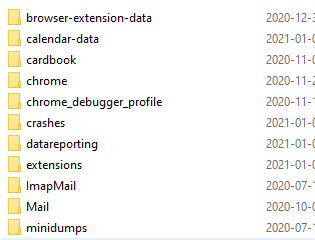
When you click Show in Finder, the profile folder should appear as in the attached picture. Open Mail (POP accounts) or ImapMail (IMAP accounts), then open the subfolder named after the account, e.g. secure.emailsrvr.com for Rackspace. Copy the dat file from the old mac to the new one, overwriting the existing file. When you restart TB, the filters should appear the same as on the old mac.
Wšykne wótegrona (4)
Filters are stored in the msgFilterRules.dat file in each account subfolder of Mail or ImapMail. Help/Troubleshooting, Profile Folder, Show in Finder, to open the profile folder, close TB, then look in, e.g. Mail/pop.gmail.com or ImapMail/imap.mail.yahoo.com, and copy the dat files from the old to the new profile. Filter files can also be copied between accounts in the same profile.
Thank you! Can you clarify what you mean by Mail or ImapMail and where to go to place the .dat file? My mail is hosted at Rackspace.
Wubrane rozwězanje
When you click Show in Finder, the profile folder should appear as in the attached picture. Open Mail (POP accounts) or ImapMail (IMAP accounts), then open the subfolder named after the account, e.g. secure.emailsrvr.com for Rackspace. Copy the dat file from the old mac to the new one, overwriting the existing file. When you restart TB, the filters should appear the same as on the old mac.
Thank you! Much appreciated - this saved a ton of time and headache.