


How to prevent Firefox forced updates

Is there an easy way to prevent Firefox from forcing me to restart after every update?
I came across this thread here: https://support.mozilla.org/en-US/questions/1277002 but I'm unsure if it applies since it is under "Firefox for Enterprise".
I find this feature to be very user-unfriendly as it interrupts my work.
In Chrome, automatic updates still occur, but I believe (in my non-technical perspective) that the update is not actually installed until you restart the browser (there's a little red arrow in the top-right corner that notifies you that an update is pending).
I understand the need to keep browsers up to date so that they have the latest security features. However, I'd prefer if the browser didn't force me to restart, and could instead do it when it is convenient for me.
Wšykne wótegrona (4)
You can disable automatic update via "Options/Preferences -> General". That way Firefox will prompt you when a update is available and you can manually update via "Help -> About Firefox".
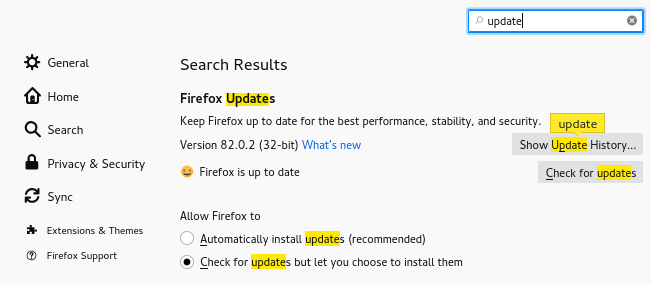
There are no such options unfortunately. Here are screenshots under "General" and also under "Firefox Updates".
You seem to be using Firefox from the Ubuntu repositories and in that case Ubuntu software management is responsible for managing updates and you can't control this in Firefox. For more control you will have to use Firefox from the Mozilla server.
You are right. Thanks!
This question has been locked because the original author has deleted their account. While you can no longer post new replies, the existing content remains available for reference.