


Starts but shows following: <key id="save-key" ... and so on.

I have HP laptop with Win 10. Thunderbird starts but then shows some strange lines: <key id="save-key" , <label value="&event.statusbarpanel.privacy.label;" >, <toolbarbutton . nothing happens. < p></key>
Wšykne wótegrona (15)
Do those lines appear when you run in safe mode (hold Shift when you launch TB)?
When I start Thunderbird after installation, it is OK. But when I copied my profile from another laptop (Win 7), Thunderbird crashes. Safe mode does not help.
Wót Hannu změnjony
Hannu said
When I start Thunderbird after installation, it is OK. But when I copied my profile from another laptop (Win 7), Thunderbird crashes. Safe mode does not help.
How did you copy the profile from the other computer? Post the latest crash URL if you can from Help/Troubleshooting, Crash Reports, or look in C:\Users\username\AppData\Roaming\Thunderbird\Crash Reports\submitted for the newest file and post the name, e.g. bp-02c...
I copied just as instructed on the Thunderbird site. After installation when I opened TB everything seemed to be fine. When I close TB and open it again it crashes. No Crash Reports are available. Help cannot be opened. See the attached screen copy.
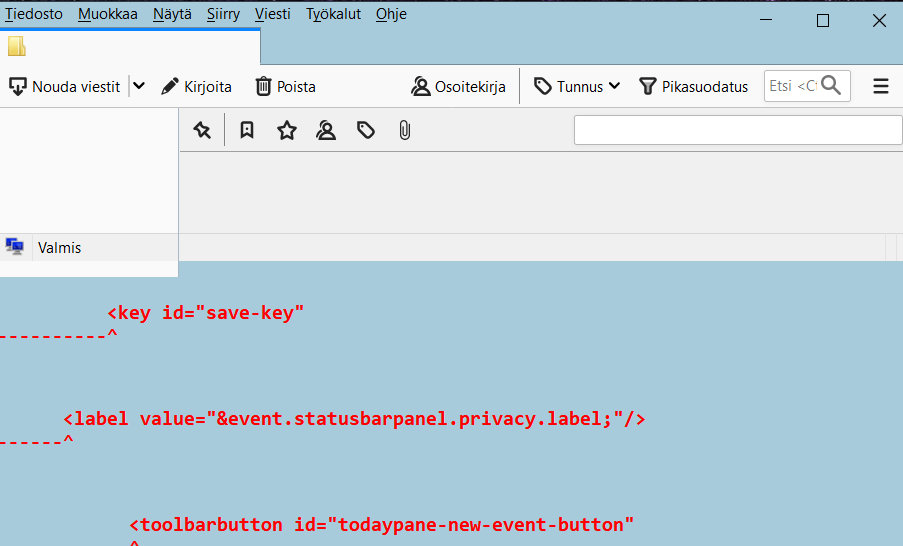
The display is almost definitely caused by an incompatible add-on:
http://kb.mozillazine.org/Gray_bar_below_status_bar
but you say it still appears in safe mode, with all add-ons disabled?
Close TB, Windowskey+R, type thunderbird.exe -p and create a new profile. Add your accounts and transfer data from the old one if necessary.
Tried the safe mode and it worked with add-ons disabled. Then I removed the only add-on Lightning without success. Is it possible to save the working situation (add-ons disabled) as a new profile?
In the safe mode I tried to perform the changes and restart, but nothing happens.
Wót Hannu změnjony
If it works in safe mode but add-ons are not causing the problem, you may have a broken layout. Launch in safe mode, check 'reset toolbars and controls' and click 'make changes and restart'. Does it now work properly in normal mode?
'make changes and restart' does not work. Nothing happens!
Close TB, open the profile folder and rename xulstore.json, then start TB. This is the same as 'reset toolbars and controls'.
Did it, but did not help. TB starts, a small window flashes, and closes. Just like before.
Two things to try: create a new profile as explained above and see if TB starts properly.
Run Windows in safe mode and see if TB runs properly. This is to test if startup apps or graphics drivers are an issue. Do you recall if you enabled hardware acceleration in Options/Advanced/General?
New profile works well. I do not know where is Options/Advanced/General (my language in TB is Finnish) Here is the information report from TB:
   Nimi: Thunderbird
   Versio: 68.5.0
   Koosteen tunniste: 20200210021033
   Päivityskanava: release
   Selaintunniste: Mozilla/5.0 (Windows NT 10.0; WOW64; rv:68.0) Gecko/20100101 Thunderbird/68.5.0
   Käyttöjärjestelmä: Windows_NT 10.0
   Käynnistysprosessi: Käytössä
   Useaa prosessia hyödyntäviä ikkunoita: 0/0
             Poistettu käytöstä
   Etäprosessit: 0
   Yrityskäytännöt: Ei käytössä
   Google Location Service -avain: Puuttuu
   Google Safebrowsing -avain: Puuttuu
   Mozilla Location Service -avain: Puuttuu
   Vikasietotila: true
 Sähköposti- ja keskusteluryhmätilit
  ***** accounts removed *****
Kaatumisilmoitukset viimeisen 3 päivän aikana
Etäprosessit
Tyyppi: Määrä
Laajennukset
     Nimi
     Versio
     Käytössä
     ID
       Bing
       1.0
       true
       bing@search.mozilla.org
       DuckDuckGo
       1.0
       true
       ddg@search.mozilla.org
       Google
       1.0
       true
       google@search.mozilla.org
       Wikipedia (fi)
       1.0
       true
       wikipedia@search.mozilla.org
Tietoturvaohjelmat
Tyyppi: Nimi
     Virustentorjunta: F-Secure Internet Security;McAfee VirusScan
     Vakoiluntorjunta:
     Palomuuri: McAfee Firewall
Grafiikka
     Ominaisuudet
     Koostaminen: Basic
     Asynkroninen siirto/lähennys: ei mitään
     WebGL 1 -ajurin WSI-tiedot: -
     WebGL 1 -ajurin mallintaja: WebGL is currently disabled.
     WebGL 1 -ajurin versio: -
     WebGL 1 -ajurin laajennukset: -
     WebGL 1 -laajennukset: -
     WebGL 2 -ajurin WSI-tiedot: -
     WebGL 2 -ajurin mallintaja: WebGL is currently disabled.
     WebGL 2 -ajurin versio: -
     WebGL 2 -ajurin laajennukset: -
     WebGL 2 -laajennukset: -
     Tavoitteellinen kuvataajuus: 60
     DirectWrite: true (10.0.18362.476)
     GPU #1
     Aktiivinen: Kyllä
     Kuvaus: AMD Radeon(TM) RX Vega 10 Graphics
     Valmistajan tunnus: 0x1002
     Laitteen tunnus: 0x15d8
     Ajurin versio: 26.20.11002.3002
     Ajurin päiväys: 4-29-2019
     Ajurit: aticfx64 aticfx64 aticfx64 amdxc64 aticfx32 aticfx32 aticfx32 amdxc32 atiumd64 atidxx64 atidxx64 atiumdag atidxx32 atidxx32 atiumdva atiumd6a
     Alijärjestelmän tunnus: 00000000
     Muisti: 2048
GPU #2
     Diagnostiikka
     AzureCanvasBackend: skia
     AzureContentBackend: skia
     AzureFallbackCanvasBackend: cairo
     ClearType-parametrit: Gamma: 1,8 Pixel Structure: RGB ClearType Level: 100 Enhanced Contrast: 50
     Päätösloki
     HW_COMPOSITING: disabled by user: Disabled by prefblocked by runtime: Acceleration blocked by safe-mode
     D3D11_COMPOSITING: unavailable by default: Hardware compositing is disabled
     DIRECT2D: unavailable by default: Direct2D requires Direct3D 11 compositing
     D3D11_HW_ANGLE: unavailable by default: D3D11 compositing is disableddisabled by env: D3D11 compositing is disabled
     GPU_PROCESS: unavailable by default: Multi-process mode is not enabledblocked by runtime: Safe-mode is enabled
     WEBRENDER: opt-in by default: WebRender is an opt-in featureunavailable-no-angle by runtime: ANGLE is disabled
     WEBRENDER_QUALIFIED: blacklisted by env: No qualified hardware
     OMTP: blocked by runtime: OMTP blocked by safe-mode
Kaatumisvahdin käytöstä poistamat ominaisuudet
Hätäratkaisut
Virheloki
Media
- This section removed, because the message was too long *****
Tärkeät muutetut asetukset
   accessibility.typeaheadfind.flashBar: 0
   browser.cache.disk.amount_written: 229144
   browser.cache.disk.capacity: 1048576
   browser.cache.disk.filesystem_reported: 1
   browser.cache.disk.smart_size_cached_value: 358400
   browser.cache.disk.smart_size.first_run: false
   browser.cache.disk.smart_size.use_old_max: false
   dom.apps.reset-permissions: true
   extensions.lastAppVersion: 68.5.0
   font.internaluseonly.changed: true
***** font.names and font.sizes removed *****
   gfx.blacklist.suggested-driver-version: 10.6
   gfx.direct3d.last_used_feature_level_idx: 0
   idle.lastDailyNotification: 1581518176
   layers.mlgpu.sanity-test-failed: false
   media.gmp.storage.version.observed: 1
   media.hardware-video-decoding.failed: false
   network.cookie.prefsMigrated: true
   network.predictor.cleaned-up: true
   places.database.lastMaintenance: 1581257938
   places.history.expiration.transient_current_max_pages: 50902
   plugin.importedState: true
   plugins.update.notifyUser: true
   privacy.donottrackheader.enabled: true
   security.sandbox.content.tempDirSuffix: {f510d9ea-0ff6-4f12-a817-9d47d94b08b2}
   security.sandbox.plugin.tempDirSuffix: {5b049f67-80b5-4948-b481-26fea8a59fd1}
   signon.importedFromSqlite: true
   storage.vacuum.last.index: 1
   storage.vacuum.last.places.sqlite: 1580069773
Tärkeät lukitut asetukset
Places-tietokanta
JavaScript
Jatkuva roskienkeräys: true
Esteettömyystoiminnot
   Käytössä: true
   Estä esteettömyystoiminnot: 0
   Esteettömyyskäsittelijää käytetty: true
   Esteettömyyden käynnistänyt ohjelma: UNKNOWN|
Kirjastojen versiot
     Odotettu minimiversio
     Käytössä oleva versio
     NSPR
     4.21
     4.21
     NSS
     3.44.3
     3.44.3
     NSSSMIME
     3.44.3
     3.44.3
     NSSSSL
     3.44.3
     3.44.3
     NSSUTIL
     3.44.3
     3.44.3
Hiekkalaatikko
   Sisältöprosessin hiekkalaatikkotaso: 0
   Sisältöprosessin efektiivinen hiekkalaatikkotaso: 1
Internationalisointi ja lokalisointi
     Sovelluksen asetukset
     Pyydetyt localet: ["fi"]
     Käytettävissä olevat localet: ["fi","en-US"]
     Sovelluksen localet: ["fi","en-US"]
     Alueasetukset: ["fi-FI"]
     Oletuslocale: "fi"
     Käyttöjärjestelmä
     Järjestelmän localet: ["fi-FI"]
     Alueasetukset: ["fi-FI"]
The Google equivalent in Finnish is Työkalut-asetukset Lisäasetukset Yleiset, but hardware acceleration would be disabled in a new profile.
You can add your accounts to the new profile, and to transfer local mail, address books etc. from the old profile, see the article mentioned above.
I recommend you exclude the TB profile folder from F-Secure or McAfee AV, whichever one is running (only one should be active).
Hi again, Finally I managed to use the old profile. I do not know what was the cure, because I tried several things at the same time. I updated Java in the old computer, removed Lightning there, copied the profile, and removed some files from it. And then it worked! Many thanks for your help and patience. It was nice that you replied quickly to my messages and really tried to help. Best wishes, Hannu