


How to do a clean install without importing previous data?

I'm trying to do a clean install of Firefox to return to 100% default settings. I don't want any of my old data, bookmarks, cookies, or browsing history, but every time I uninstall and reinstall Firefox, all of my previous bookmarks along with my browsing history are imported into Firefox.
How do I do an actual clean install, that allows me to start over without importing any previous data?
- edit
I've also deleted my Firefox account and opened a new one multiple times, which I would assume would delete my old data. But even after deleting my account my old data is still imported to Firefox after uninstalling and re-installing it.
Wót alexgj88 změnjony
Wubrane rozwězanje
I wound up resetting my PC (deleting all files and folders). It was a relatively new PC so this wasn't an issue. Thank you all for the replies, though.
Wšykne wótegrona (7)
User data is stored in the Profile folder which is not removed when Firefox is uninstalled. If you want a "fresh start" without any Firefox user data the two Profile folders (roaming and local file paths) need to be deleted.
https://support.mozilla.org/en-US/kb/profiles-where-firefox-stores-user-data

Use these links to create a new profile.
https://support.mozilla.org/en-US/kb/how-run-firefox-when-profile-missing-inaccessible
http://kb.mozillazine.org/Profile_folder_-_Firefox#Navigating_to_the_profile_folder
https://support.mozilla.org/en-US/kb/profile-manager-create-and-remove-firefox-profiles
https://support.mozilla.org/en-US/kb/back-and-restore-information-firefox-profiles
Type about:profiles<enter> in the address bar.
I deleted this folder:
C:\Users\<your Windows login username>\AppData\Roaming\Mozilla\Firefox\Profiles\
Now I'm receiving this error message (see attachment)
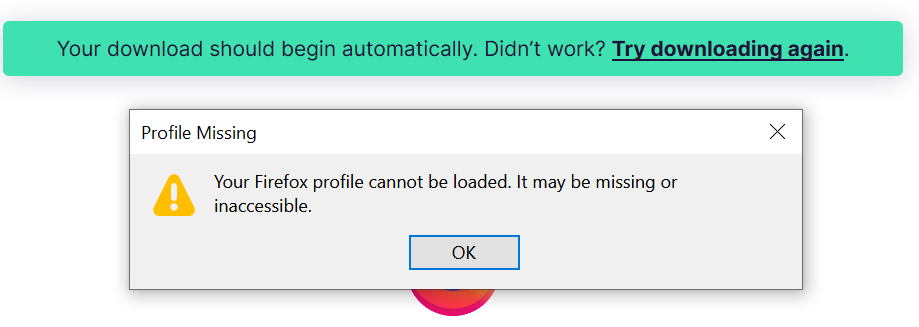
The Profile needs to be deleted before re-installing Firefox. When installing Firefox it looks for the presence of an existing Profile; when none is found a new Profile will be created.
You need to delete profiles.ini and installs.ini when present in the Firefox folder.
- C:\Users\<user>\AppData\Roaming\Mozilla\Firefox\
I have already re-installed Firefox, but then received the error message listed in my reply above
Wubrane rozwězanje
I wound up resetting my PC (deleting all files and folders). It was a relatively new PC so this wasn't an issue. Thank you all for the replies, though.