


How do I abrogate changes in v70 to search bar?
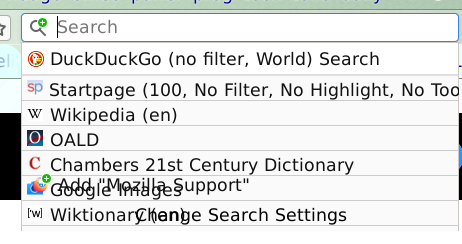
Suddenly my search bar lists only 7 (was 6) of about 20 search engines. The command "Change Search Settings" appeared on the same line as the 6th listed engine so that clicking on it summoned that search engine. Now "Add Mozilla Support" appears on that line and the other command appears on the same line as the 7th engine.
Wubrane rozwězanje
You can use just the code from the separate tab. The icons code doesn't work any more in Firefox 69+ but I haven't had time to update the page.
Wšykne wótegrona (4)
Hi ender21, it looks a bit like a userChrome.css recipe you might have picked up from me. Can you regenerate the code to adapt to changes in Firefox 69-70:
https://www.jeffersonscher.com/gm/search-bar-names.html
Any luck?
'Thanks for replying. The code I get on that page begins with //Retrieval from userstyles.org unsuccessful (Status: 0; StatusText: ) //Try loading the generated script in a new tab: userstyles.org code.
// Combine with the userstyles.org code:
/* Icons for many built-in search engines */'
It deals with "icons for many built-in search engines". I am not presently using any such code. The code I have is like the "userstyles.org code" which I get in a separate tab. I guess I should replace the present code with the latter. Do I need to add the former?
Wubrane rozwězanje
You can use just the code from the separate tab. The icons code doesn't work any more in Firefox 69+ but I haven't had time to update the page.
Thanks for your help. I have the full search bar back. The 'tooltips' (names of search engines) are fainter than I remember but so far can't make them any more visible. Have marked this as solved.