


How do I change the Firefox window title?
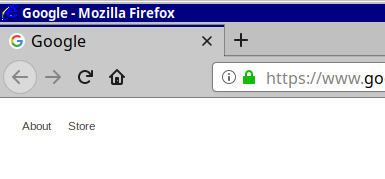
Currently the window title is in the format "Page name - Mozilla Firefox" for example "Google - Mozilla Firefox".
I would like to change the title bar so that it says "Google - Microsoft Internet Explorer". See the attached image.
Wšykne wótegrona (5)

I don't that part on my Browser are you using the default firefox install or userChrome.css?
Hi aaronfranke, I'm not aware of any setting that would allow you to easily change the "- Mozilla Firefox" to "- Other Text".
I'm not sure why you need this, but in case it matters, I do think it's possible to change the title to:
Google - Microsoft Internet Explorer - Mozilla Firefox
by modifying the page title with an add-on or script to end with
" - Microsoft Internet Explorer"
WestEnd said
I don't that part on my Browser are you using the default firefox install or userChrome.css?
Hi WestEnd, the poster turned on the Title Bar in Customize (checkbox in the lower left corner). But the old IE icon is definitely not a built-in feature.
Actually, in my case, the icon comes from a system-wide theme on Linux called Chicago95. The whole point of this project was to make a modern OS "pretend" to be Windows 95.
Maybe check this extension to see if it can make these changes.
- Nightly Tester Tools https://addons.mozilla.org/firefox/addon/nightly-tester-tools/