Toś ta nitka jo se archiwěrowała.
Pšosym stajśo nowe pšašanje, joli trjebaśo pomoc.

Archiwěrowany
Thunderbird does not keep time zone on forwarding an email.

I first noticed this on Monday, 16 April 2018 at around 11:30 +0200 (Johannesburg, South Africa). I did not have this problem last week.
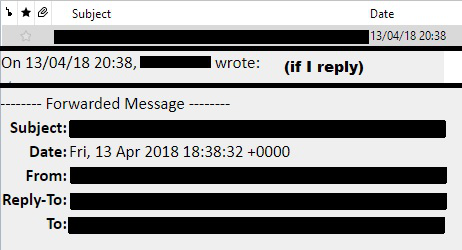
I received an email which I wanted to forward. Thunderbird adjusted the time zone on the forwarded email to +0000. When replying, the time zone stays correct at +0200, but when I try to forward any email, it appears as +0000 and the time of the original message is set two hours back.
So a message received at 20H38 +0200 (Johannesburg, South Africa time) in my inbox, appears as 20H38 +0200 when replied to the person. BUT it appears as 18H38 +0000 when I press the Forward button
I first noticed this on Monday, 16 April 2018 at around 11:30 +0200 (Johannesburg, South Africa).
I did not have this problem last week.
I received an email which I wanted to forward.
Thunderbird adjusted the time zone on the forwarded email to +0000.
When replying, the time zone stays correct at +0200, but when I try to forward any email, it appears as +0000 and the time of the original message is set two hours back.
So a message received at 20H38 +0200 (Johannesburg, South Africa time) in my inbox,
appears as 20H38 +0200 when replied to the person.
BUT it appears as 18H38 +0000 when I press the Forward button
Wšykne wótegrona (1)
EDITED screen captures showing the problem.