


how to configure "Edit This Bookmark" dialog box?

Hi
I would like the "Edit This Bookmark" dialog box to show all the sub-folders to "Other Bookmarks" right away instead of having to do 2 clicks AND scroll, because the dialog box will only use a small part of my screen. Is that possible?
Best regards, Henrik R.
Wšykne wótegrona (3)
Am I the only one who thinks that the way the "Edit This Bookmark" dialog box works in Firefox (ESR v.52.6.0 64-bit) is limiting and anti-practical? I haven't been able to find an Extension or addon that solves the limitations. Please respond.
Hi Henrik, add-ons currently can't directly modify the dialog. (It's possible for an add-on to create its own dialog for adding/editing bookmarks, but I'm not aware of one off the top of my head.)
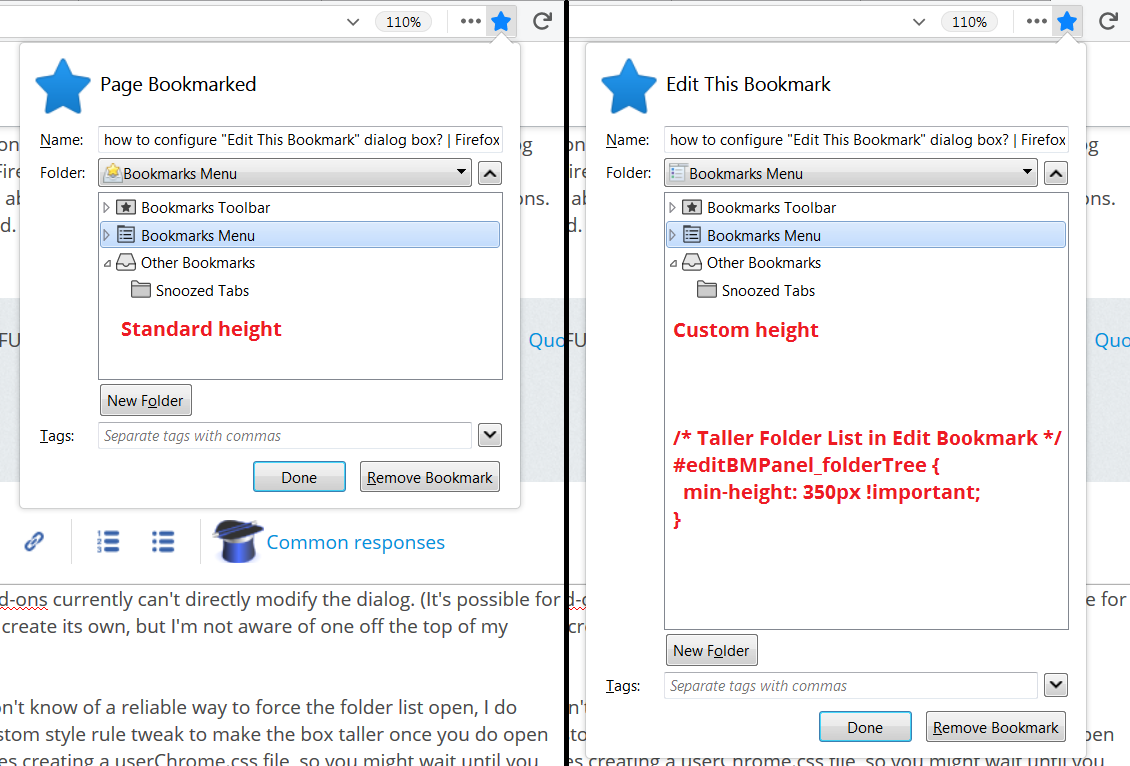
Although I don't know of a reliable way to force the folder list open, I do know of a custom style rule tweak to make the box taller once you do open it. This involves creating a userChrome.css file, so if you are new to that, you might wait until you have 10-15 minutes for the project.
A screenshot demonstrating the effect of this rule is attached for reference:
/* Taller Folder List in Edit Bookmark */
#editBMPanel_folderTree {
  min-height: 350px !important;
}
(You can adjust that height as desired, but 350 pixels should be a safe starting point.)
My page here has steps and boring videos on how to set up a userChrome.css file: https://www.userchrome.org/how-create-userchrome-css.html
Similar thread: How do I show more than 7 folders in the Bookmarks "Choose" list (need a taller dropdown!)?
Thank you very much! That helps.
I have just posted another similar question: "How to get longer, scrollable, list of visited URLs and bookmarks in Address Bar?" - https://support.mozilla.org/en-US/questions/1207517 . Maybe you know the answer to that too? :-)