


Can not receive new email even inbox folder is empty.

Hello, I've tried to clear Inbox folder and compacted it. But I still could not receive new email with the alert: "mail box is full..." (sending is ok). Please help, thanks!
Wubrane rozwězanje
It would seem as you can still receive on server, that limits have not been reached. But why are keeping all very old mail on the server and left in the Inbox? I do not know what sort of limits are imposed by the server or whether it is truely 'unlimited' in number of emails and size or only in the number of folders you can create. Most POP mail accounts do not generally allow large sizes as it is expected you download and delete off server by default.
This is a real conundrum as usually the reason is either too many emails on server or too many emails in Inbox. The usual fix is deleting emails and compacting folders.
So I'm trying to think of what else could be causing this 'mailbox is full' error.
Try this: In Thunderbird
- 'Help' > 'Troubleshooting Information'
- click on 'show folder' button
- Close Thunderbird now - this is important
Delete this file, it is a Mail folder cache. It can be safely deleted to resolve various issues. A new one will be auto created upon restarting Thunderbird.
- panacea.dat
restart Thunderbird
Wšykne wótegrona (18)
You posted in the Firefox support fora queue. Firefox doesn't do email, it's strictly a web browser.
If you are using Firefox to access your mail, you are using "web-mail" such as Yahoo!Mail or Gmail. You need to seek support from your service provider or a forum for that service.
If your problem is with Thunderbird, let us know and we can move this thread to the Thunderbird support queue.
https://support.mozilla.org/en-US/kb/problems-with-email-how-to-find-help
Yes, I really got problem with Thunderbird. Thanks
Have you emptied 'Junk' and then compacted 'Junk' ? Have you emptied 'Deleted/Trash' and then compacted 'Deleted/Trash' ?
If you logon to webmail account via a browser, are there a load of emails still in the account? Is there an 'All Mail' folder on the server viewable in webmail?
If you send yourself an email, does it appear in the webmail account ? You may need to refresh the webmail account window to see it.
Is this an imap or pop mail account? Is a gmail account? If no what server are you using?
Hi, I emptied "Junk" + "trash" and compacted all -> Nothing changed.
When I log on to webmail account, all the load mails still available.
All mails can be seen in webmail (inbox folder)
I can receive mail sent by myself in the web mail account.
It's POP mail.
Try this to see if the index file is causing the issue. Right click on the Inbox Folder of pop mail account. select 'Properties' 'General Information' tab - click on 'Repair Folder' click on OK select another folder and reselect the Inbox.
click on 'get Messages' and report back whether emails downloaded.
Sorry, I followed your instructiona but still could not download any mail. Is there any other way?
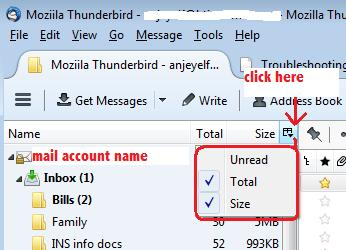
In the Folder Pane, do you have the 'Size' column enabled? If no: 'Menu icon' > 'Options' > 'Layout'> select 'Folder Pane Columns' then in Folder Pane, click on the small icon to the right of 'Name' and enabled the 'Size' column - see image below.
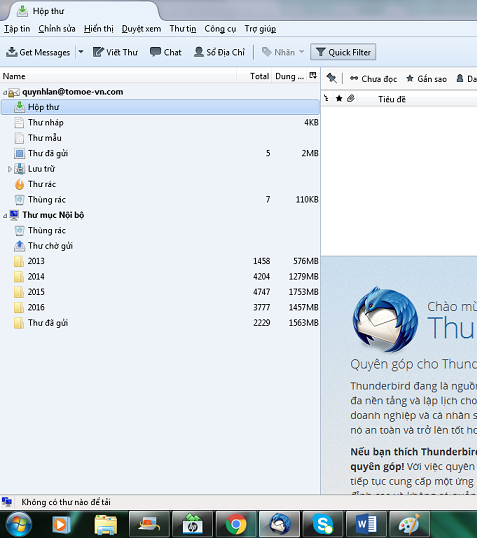
What size is the Inbox ?
My inbox size is 0KB. Please refer to attach immage:
right click the folder, select properties.
What size on disk is reported there?
Matt, I did as you guide, Number of Messages: 0; Size on disk: 0Kb
Please try this: Make hidden files and folders visible:
In Thunderbird
- 'Help' > 'Troubleshooting Information'
- click on 'show folder' button
a new window opens showing the contents of your 'Profile name' folder. (Note: should you want to perform a backup - go up directory and copy the 'Profile name' folder which is probably called 'xxxxxxxx.default' where the x's are letters and numbers. Paste the folder onto eg: external hardrive. This will act as your backup).
- Close Thunderbird now - this is important
- click on 'Mail' folder
- click on pop mail account name
You will see a list of mbox files (no extension), they contain emails. you will also see a list of .msf files; these are indexing files and do not contain emails.
Delete these files:
- 'Inbox' (no extension)
- 'Inbox.msf'
As you have already moved all emails out of the Inbox, you will not lose any emails. These files will be auto recreated when you start thunderbird.
Start thunderbird. Report back on results.
Thanks for your patience, Toad-Hall! I did as follow: Help' > 'Troubleshooting Information' click on 'show folder' button ->close Thunderbird In Mail folder, choose popmail account ->Delete "inbox" and "inbox.msf" Reopen Thunderbird -> Still receive warning: mailbox is full ...
Lets see if the cache Windows creates is influencing this. Please close Thunderbird now.
Access this file:
- C:\Users\<Windows user name>\AppData\Local\Thunderbird\Profiles
It will contain your profile name folder, but not the one which Thunderbird uses to contain all your profile accounts, emails, etc. Windows creates it and uses it as a cache.
Please delete the profile name folder usually called 'xxxxxxxx.default' where the x's are letters and numbers. If there is more than one then delete all.
Restart Thunderbird
It's still no change...
The image you posted looks like you have archived a load of emails into 'Local Folders' mail account folders.
It would be a good idea to backup your 'profile name' folder to an external device eg: external harddrive, usb, disc etc
Some people download and delete off server. Others, keep copies of emails on server for a period eg: month and then they get deleted. But there are some people who just leave all copies on the server and they rarely delete them.
I do not know what settings you use for deleteing emails off the server nor how much mail you have on the webmail server, but after backing up the profile name folder, could you do some serious deleting via webmail. Deleteing all but this last months mail and making sure server junk/spam and trash get emptied as well.
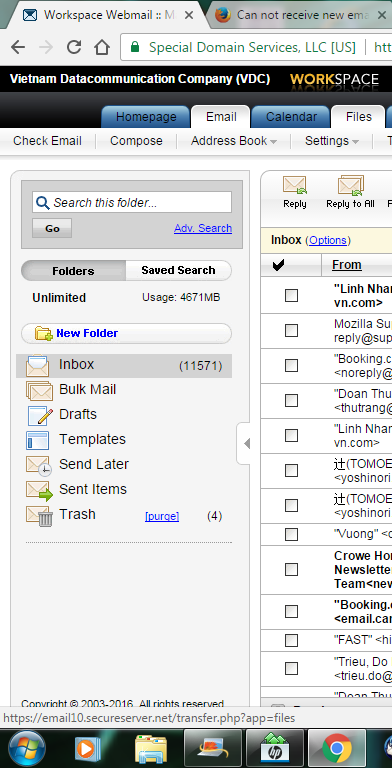
I do not delete any email off server. Total mails I have on the webmail server and disk capacity you can see in bellow pic:
Wubrane rozwězanje
It would seem as you can still receive on server, that limits have not been reached. But why are keeping all very old mail on the server and left in the Inbox? I do not know what sort of limits are imposed by the server or whether it is truely 'unlimited' in number of emails and size or only in the number of folders you can create. Most POP mail accounts do not generally allow large sizes as it is expected you download and delete off server by default.
This is a real conundrum as usually the reason is either too many emails on server or too many emails in Inbox. The usual fix is deleting emails and compacting folders.
So I'm trying to think of what else could be causing this 'mailbox is full' error.
Try this: In Thunderbird
- 'Help' > 'Troubleshooting Information'
- click on 'show folder' button
- Close Thunderbird now - this is important
Delete this file, it is a Mail folder cache. It can be safely deleted to resolve various issues. A new one will be auto created upon restarting Thunderbird.
- panacea.dat
restart Thunderbird
Finally, I could fixed it. I deleted some thousands mails off server. And now everything goes well. May I close this topic. Thank you very much!