


Malicious f.asdfzxcy1312.com - i tried everything. nothing works.

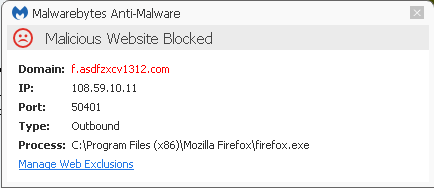
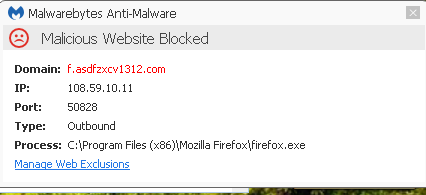
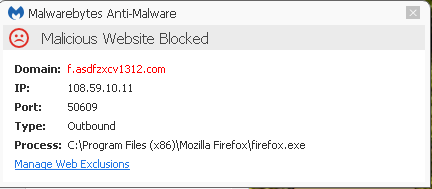
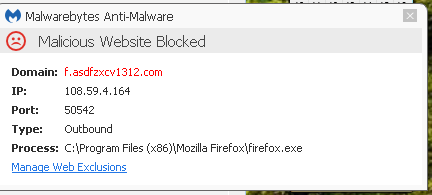
Ever since I installed the latest Firefox, I have a problem with : Malicious Website Blocked Domain: f.asdfzxcy1213.com IP: 108.59.10.11 Port: 5041 Type: Outbound Process: C:\Program Files (x86) Mozilla Firefox\firefox.exe
Your support had a similar problem so I tried EVERYTHING on the solutions suggested for that problem. Nothing worked. I uninstalled Firefox and the problem disappeared. I did a virus check scan and malware scan. The I downloaded the current Firefox Version and installed it. Now the problem has come back. What's going on. It seems that the problem is in the Firefox software and only happens when it's installed on my computer. I have no choice but to uninstall my Firefox and use the browser I hate, Internet Explorer, unless your company can fix the problem, I have no other options.
Wubrane rozwězanje
I followed this solution and did all of the suggestions and none of them worked. At about midnight on August 1, 2016 I deleted Firefox again off of my computer. I deleted all of the personal preferences also. Then I downloaded a clean and new copy of Firefox from Mozilla.org. I only get my Firefox from Mozilla.org
So far, it's been running smoothly and the malicious blocking message has not shown up. Perhaps when I deleted the Firefox program the second time, and deleted all of my personal preferences with it, that might have gotten rid of the problem. I had done many virus scans and malware scans before and after deleting the Firefox program off of my computer. None of the scans showed any malware or viruses, so I have been at a loss trying to fix the problem. I do not like Internet Explorer browser and have used Firefox for many, many years. If the problem starts again, I will let you know because it is frustrating to have such a problem and not be able to make it go away. I am not trying to slander Mozilla, I use Thunderbird as well and have for many years and will continue to use them for many years.
Toś to wótegrono w konteksće cytaś 👍 0Wšykne wótegrona (5)
Normally, when you uninstall and reinstall Firefox, your data is preserved, so the problem may have remained behind in the form of an add-on, for example.
When does the dialog come up -- is it associated with a particular action such as opening a new window, opening a new tab, or visiting a particular site?
As a test, could you do this five-minute experiment:
Create a new Firefox profile
A new profile will have your system-installed plugins (e.g., Flash) and extensions (e.g., security suite toolbars), but no themes, other extensions, or other customizations. It also should have completely fresh settings databases and a fresh cache folder.
Exit Firefox and start up in the Profile Manager using the system search box or the Run dialog. Type or paste the following and press Enter to submit it:
firefox.exe -P
Don't delete anything here!
Any time you want to switch profiles, exit Firefox and return to this dialog.
Click the Create Profile button, assign a name like August2016, and skip the option to relocate the profile folder. After creating the profile, select it and start Firefox in that profile.
Does it run clean?
You can selectively copy data from your old profile to this new one*, or you can return to the old profile and try using the Refresh feature to remove various custom settings and add-ons as a half-way measure.
When returning to the Profile Manager, you might be tempted to use the Delete Profile button. But... it's a bit too easy to accidentally delete your "real" profile, so I recommend resisting the temptation. If you do want to clean up later, I suggest making a backup of all your profiles first in case something were to go wrong.
* We can advise on this in more detail, but for general background, see: Restore bookmarks, passwords and data from an old Firefox profile.
The 32-bit and 64-bit Firefox for Windows from www.mozilla.org/firefox/all/ is not infected by anything including this f.asdfzxcy1312 .com. It also would be a hot topic here, and at places like the independent mozillaZine forums and any forums and news sites that talk about Firefox versions if it was true and the setups would have been removed or replaced by Mozilla.
If you downloaded Firefox from outside of mozilla.org then there is no guarantee it was the same clean version you would get from Mozilla. If you did download from mozilla.org then perhaps you have malware on your system that is targeting Firefox .exe
Also you have to be careful as there has been disposable random name websites popping up in the past couple months in targeting Firefox users on Windows in claiming to have a urgent Firefox update and prompts you to download a fake firefox-patch.js
If you installed this firefox-patch.js then that may be the cause.
Wót James změnjony
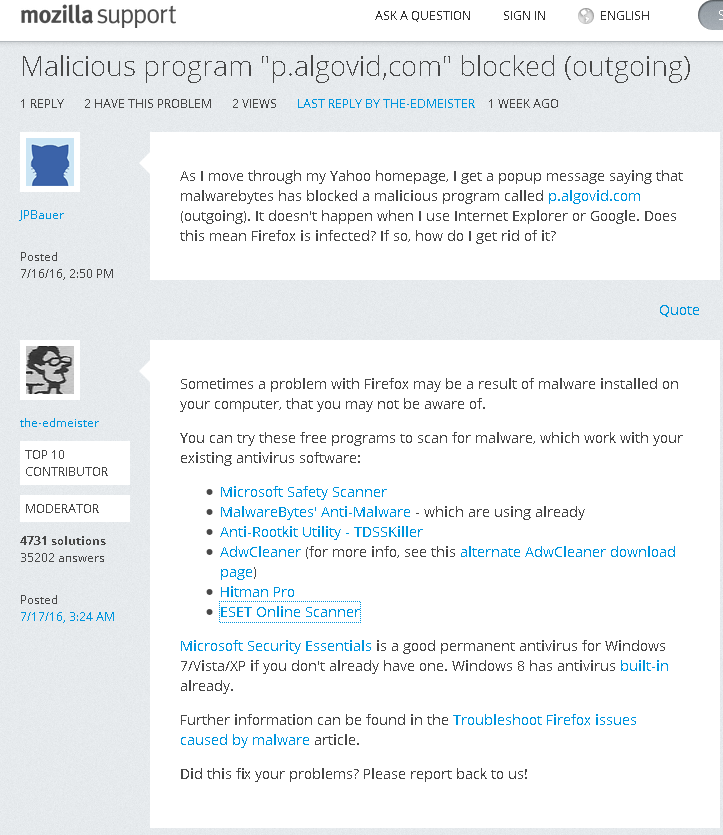
Sometimes a problem with Firefox may be a result of malware installed on your computer, that you may not be aware of.
You can try these free programs to scan for malware, which work with your existing antivirus software:
- Microsoft Safety Scanner
- MalwareBytes' Anti-Malware
- Anti-Rootkit Utility - TDSSKiller
- AdwCleaner (for more info, see this alternate AdwCleaner download page)
- Hitman Pro
- ESET Online Scanner
Microsoft Security Essentials is a good permanent antivirus for Windows 7/Vista/XP if you don't already have one. Windows 8/10 have antivirus built-in already.
Further information can be found in the Troubleshoot Firefox issues caused by malware article.
Wubrane rozwězanje
I followed this solution and did all of the suggestions and none of them worked. At about midnight on August 1, 2016 I deleted Firefox again off of my computer. I deleted all of the personal preferences also. Then I downloaded a clean and new copy of Firefox from Mozilla.org. I only get my Firefox from Mozilla.org
So far, it's been running smoothly and the malicious blocking message has not shown up. Perhaps when I deleted the Firefox program the second time, and deleted all of my personal preferences with it, that might have gotten rid of the problem. I had done many virus scans and malware scans before and after deleting the Firefox program off of my computer. None of the scans showed any malware or viruses, so I have been at a loss trying to fix the problem. I do not like Internet Explorer browser and have used Firefox for many, many years. If the problem starts again, I will let you know because it is frustrating to have such a problem and not be able to make it go away. I am not trying to slander Mozilla, I use Thunderbird as well and have for many years and will continue to use them for many years.
Thank you everyone for your suggested solutions. I fixed the problem myself by uninstalling the Firefox program, and deleting all of my Firefox preferences. then I downloaded a Firefox download file from Mozilla.org and installed it on my computer. The program has not produced one error since the new installation.