Windows 10 reached EOS (end of support) on October 14, 2025. If you are on Windows 10, see this article.

Pomoc pśepytaś

Glědajśo se wobšudy pomocy. Njenapominajomy was nigda, telefonowy numer zawołaś, SMS pósłaś abo wósobinske informacije pśeraźiś. Pšosym dajśo suspektnu aktiwitu z pomocu nastajenja „Znjewužywanje k wěsći daś“ k wěsći.

Dalšne informacije
Toś ta nitka jo se archiwěrowała. Pšosym stajśo nowe pšašanje, joli trjebaśo pomoc.
Archiwěrowany

How do I control whether the Web Developer Inspector shows the page source instead of just an element's place in the DOM hierarchy?

jimeng

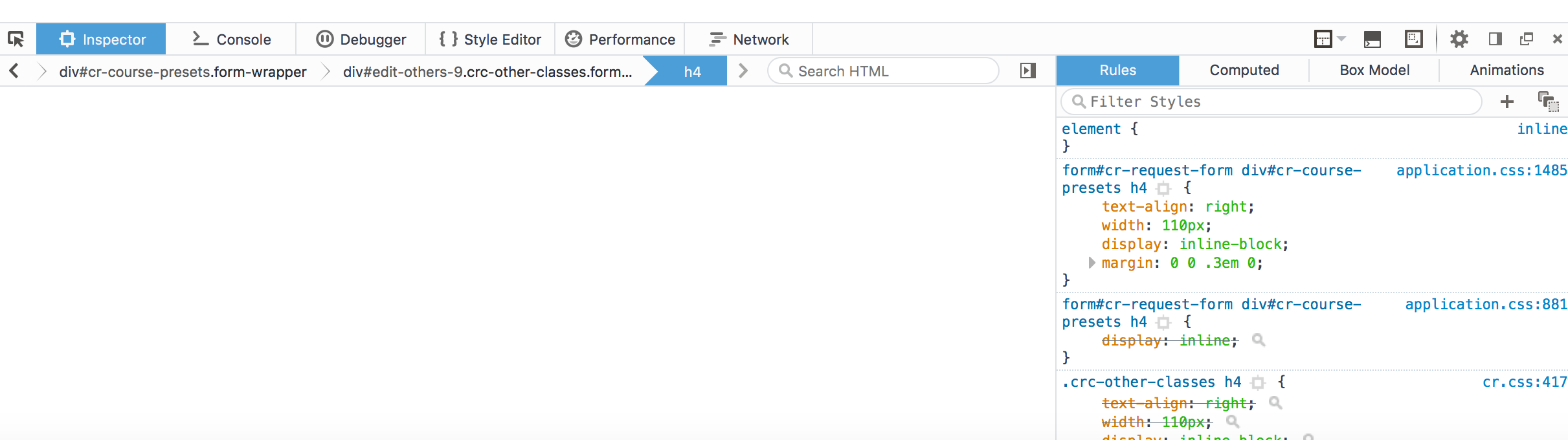
I find the Inspector (Tools -> Web Developer -> Inspector) very useful. If I can select it and then click on an element in the page, the html markup for that element is shown in the left-hand window of the Inspector tool and the CSS rules that apply are shown in the right-hand window. But from time to time, the left window will just be blank, with a small bar above it showing a set of selectors back from the body tag down to the selected element. The right window is just as functional as usual, but I cannot examine the HTML source for the element. And I can't find any way to get back to what seems to be the default mode, which is what I want.

Any advice about how to avoid getting in this other mode or how to get back if I find myself in that mode?

Thanks.

I find the Inspector (Tools -> Web Developer -> Inspector) very useful. If I can select it and then click on an element in the page, the html markup for that element is shown in the left-hand window of the Inspector tool and the CSS rules that apply are shown in the right-hand window. But from time to time, the left window will just be blank, with a small bar above it showing a set of selectors back from the body tag down to the selected element. The right window is just as functional as usual, but I cannot examine the HTML source for the element. And I can't find any way to get back to what seems to be the default mode, which is what I want. Any advice about how to avoid getting in this other mode or how to get back if I find myself in that mode? Thanks.

Wšykne wótegrona (1)

Here's a screenshot of the inspector in the mode I want to get out of.