


clicking a link outside of FF does not open in FF

I am using ff 47.0 and FF is definitely my default browser. When I click on a link in some other program, it should open in FF, but absolutely nothing happens. I try changing the default to Chrome and then the link does indeed open in Chrome. Is FF having a problem?
Wšykne wótegrona (7)
Does it make a difference whether Firefox is running or not?
Did you check the .html key in the Windows Registry?
- HKEY_CLASSES_ROOT\.html
Interesting...When FF is NOT running, then it does open and run the URL.
Attached is a screen capture of the registry value you mentioned.
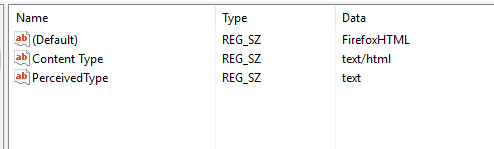
Check the target field in the Firefox desktop shortcut and make sure you do not start Firefox with the -no-remote switch or have set the environment variable MOZ_NO_REMOTE=1 (Control Panel > System > Advanced > Environment variables). If you have a MOZ_NO_REMOTE environment variable then remove this variable and do not change its value to 0 because that doesn't work (Firefox checks for its existence and not the value).
I assume that the FirefoxHTML key links to the Firefox program since it is working when Firefox isn't running.
- HKEY_CLASSES_ROOT\FirefoxHTML
Thanks Cor-El (any relation to Clark Kent?) Attached is a screen capture of HKEY_CLASSES_ROOT\FirefoxHTML, but if we go a little deeper to HKEY_CLASSES_ROOT\FirefoxHTML\shell\open\command, I find "C:\Program Files (x86)\Mozilla Firefox\firefox.exe" -osint -url "%1". Does that tell you anything?
I do NOT have any env var, MOZ_NO_REMOTE
What is meant by "desktop shortcut? I use Windows 10.

I mean the properties of the shortcut icon or menu item that you click to start Firefox.
AHA...Things seem to be different in Windows 10. In previous versions of Windows, I could right-click on a menu item, then click properties and it showed the command that would be executed. When I right click in this Windows version, there is no properties choice. How do I find that item?