


Windows 10 reached EOS (end of support) on October 14, 2025. If you are on Windows 10, see this article.

Pomoc pśepytaś

Glědajśo se wobšudy pomocy. Njenapominajomy was nigda, telefonowy numer zawołaś, SMS pósłaś abo wósobinske informacije pśeraźiś. Pšosym dajśo suspektnu aktiwitu z pomocu nastajenja „Znjewužywanje k wěsći daś“ k wěsći.

Dalšne informacije
Toś ta nitka jo se archiwěrowała. Pšosym stajśo nowe pšašanje, joli trjebaśo pomoc.
Archiwěrowany

Message Filter Problem

prescino

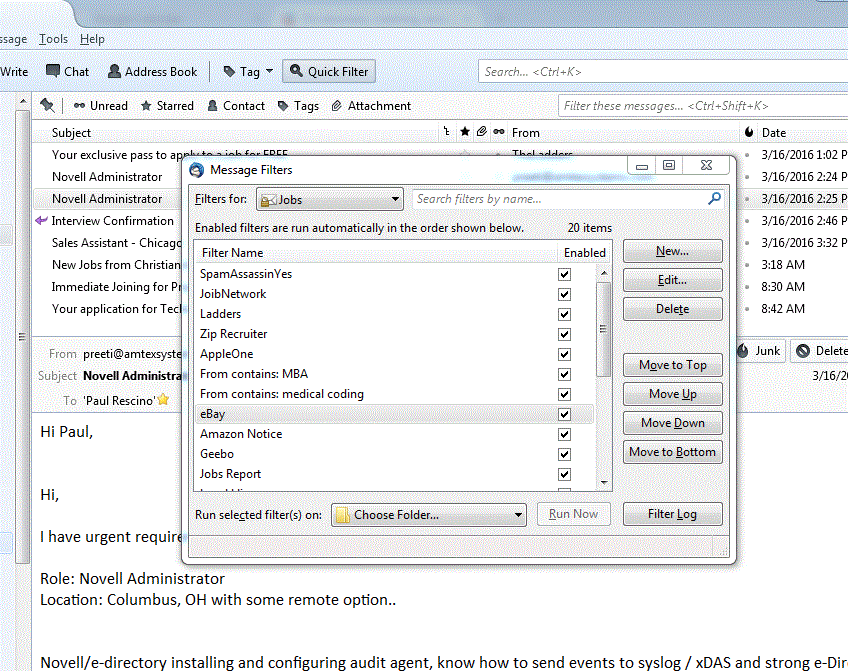
I have used message filters for a long time. I find that message filters are more efficient than spam filters. Recently, probably with an upgrade, my message filters have stopped working. The problem that I found is simple. At the bottom of the Message Filters window there is a selection, "Run selected filter(s) on:" This would usually show as Inbox on the specific account. Now this selection says, "Choose Folder..." and the filters will not run unless I go in and select the Inbox and then manually run the filters. This is very annoying because the filter should be automatic. I have added a screenshot of the Message Filters window so you can see what I am talking about.

Thank you,

Paul Rescino
I have used message filters for a long time. I find that message filters are more efficient than spam filters. Recently, probably with an upgrade, my message filters have stopped working. The problem that I found is simple. At the bottom of the Message Filters window there is a selection, "Run selected filter(s) on:" This would usually show as Inbox on the specific account. Now this selection says, "Choose Folder..." and the filters will not run unless I go in and select the Inbox and then manually run the filters. This is very annoying because the filter should be automatic. I have added a screenshot of the Message Filters window so you can see what I am talking about. Thank you, Paul Rescino
Pśipowjesone fota wobrazowki

Wšykne wótegrona (1)

That is not relevant, I have it as well and my filters run without issue.

I suggest you restart with add-ons disabled from the help menu and see if things start working then