


lighting wont start

i have thunderbird 38.1.0 and i have downloaded added lighting 4.0.1.2. in the add-ons manager its says "lighting will be installed after you restart thunderbird" when i click restart now nothing changes.
from the error log i found this error: Timestamp: 7/24/2015 4:30:40 PM Error: 1437769840726 addons.xpi ERROR Failed to remove directory C:\Users\jeff\AppData\Roaming\Thunderbird\Profiles\6wxehepw.default\extensions\staged\{e2fda1a4-762b-4020-b5ad-a41df1933103}\chrome\lightning-zh-CN\locale\zh-CN: [Exception... "Component returned failure code: 0x80004005 (NS_ERROR_FAILURE) [nsIFile.remove]" nsresult: "0x80004005 (NS_ERROR_FAILURE)" location: "JS frame :: resource://gre/modules/addons/XPIProvider.jsm :: SIO_installDirectory :: line 356" data: no] Stack trace: SIO_installDirectory()@resource://gre/modules/addons/XPIProvider.jsm:356 < SIO_installDirEntry()@resource://gre/modules/addons/XPIProvider.jsm:388 < SIO_installDirectory/<()@resource://gre/modules/addons/XPIProvider.jsm:339 < forEach()@self-hosted:206 < SIO_installDirectory()@resource://gre/modules/addons/XPIProvider.jsm:337 < SIO_installDirEntry()@resource://gre/modules/addons/XPIProvider.jsm:388 < SIO_installDirectory/<()@resource://gre/modules/addons/XPIProvider.jsm:339 < forEach()@self-hosted:206 < SIO_installDirectory()@resource://gre/modules/addons/XPIProvider.jsm:337 < SIO_installDirEntry()@resource://gre/modules/addons/XPIProvider.jsm:388 < SIO_installDirectory/<()@resource://gre/modules/addons/XPIProvider.jsm:339 < forEach()@self-hosted:206 < SIO_installDirectory()@resource://gre/modules/addons/XPIProvider.jsm:337 < SIO_installDirEntry()@resource://gre/modules/addons/XPIProvider.jsm:388 < SIO_installDirectory/<()@resource://gre/modules/addons/XPIProvider.jsm:339 < forEach()@self-hosted:206 < SIO_installDirectory()@resource://gre/modules/addons/XPIProvider.jsm:337 < SIO_installDirEntry()@resource://gre/modules/addons/XPIProvider.jsm:388 < SIO_move()@resource://gre/modules/addons/XPIProvider.jsm:411 < DirInstallLocation_installAddon()@resource://gre/modules/addons/XPIProvider.jsm:7434 < XPI_processPendingFileChanges/<()@resource://gre/modules/addons/XPIProvider.jsm:2663 < forEach()@self-hosted:206 < XPI_processPendingFileChanges()@resource://gre/modules/addons/XPIProvider.jsm:2421 < XPI_checkForChanges()@resource://gre/modules/addons/XPIProvider.jsm:3531 < XPI_startup()@resource://gre/modules/addons/XPIProvider.jsm:2097 < callProvider()@resource://gre/modules/AddonManager.jsm:208 < _startProvider()@resource://gre/modules/AddonManager.jsm:669 < AMI_startup()@resource://gre/modules/AddonManager.jsm:840 < AMP_startup()@resource://gre/modules/AddonManager.jsm:2471 < AMC_observe()@resource://gre/components/addonManager.js:55 < <file:unknown> Source File: resource://gre/modules/Log.jsm Line: 749

Wubrane rozwězanje
I ran into the same problem. After multiple installation attempts it finally worked. So just try again.
Wšykne wótegrona (7)
Remove Lightning via Add-on Manager and close Thunderbird. Delete the folder C:\Users\jeff\AppData\Roaming\Thunderbird\Profiles\6wxehepw.default\extensions\staged. Download Lightning from https://addons.mozilla.org/en-US/thunderbird/addon/lightning/ and install it again.
Wót christ1 změnjony
thanks for reply i am unable to remove lighting from add-on manager. see attached pic
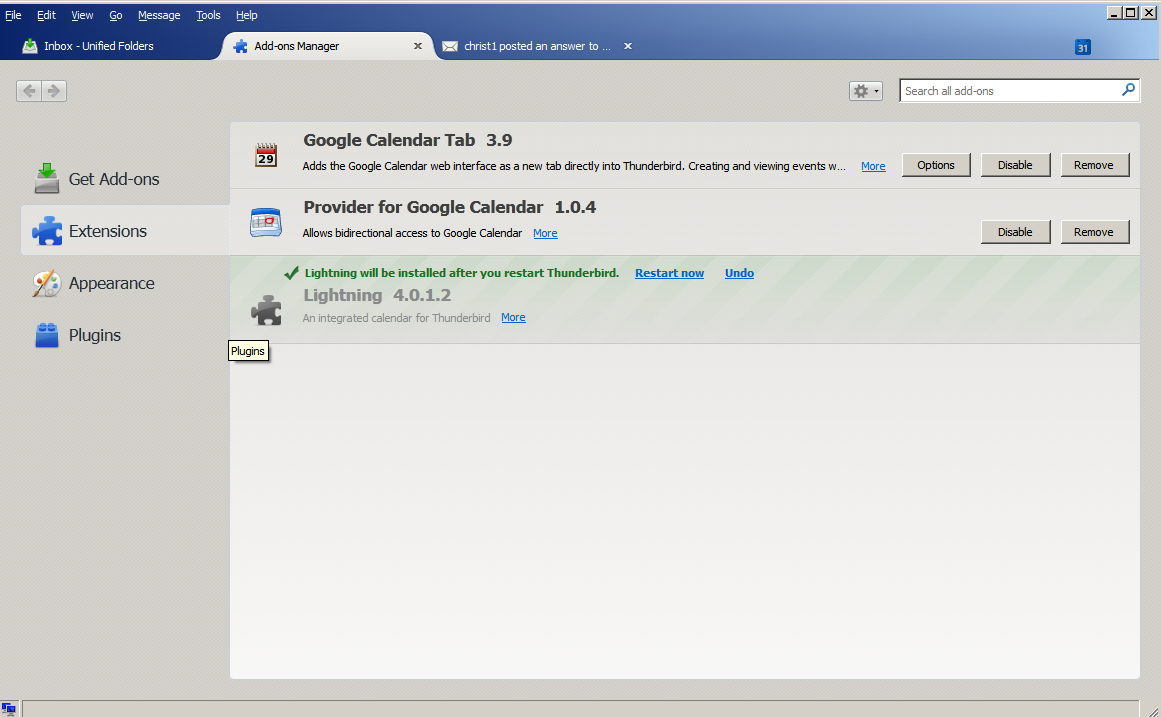
Then just skip that step.
should have wrote that i did. when i went back to add-on manager it was gone. installed and got same issue
Wubrane rozwězanje
I ran into the same problem. After multiple installation attempts it finally worked. So just try again.
after 4 try's it worked. strange
with the new update to thunderbird, lightning is not working again. have deleted the "staged" folder several times. with no luck to getting it to work. i have also unistalled and reinstalled thunderbird with no luck