


Windows 10 reached EOS (end of support) on October 14, 2025. For more information, see this article.

Pomoc pśepytaś

Glědajśo se wobšudy pomocy. Njenapominajomy was nigda, telefonowy numer zawołaś, SMS pósłaś abo wósobinske informacije pśeraźiś. Pšosym dajśo suspektnu aktiwitu z pomocu nastajenja „Znjewužywanje k wěsći daś“ k wěsći.

Dalšne informacije

Is there a way to get Message Filters to work in another folder than the Inbox folder?

  • 3 wótegrona
  • 1 ma toś ten problem
  • 34 naglědow
  • Slědne wótegrono wót finitarry

dalšne nastajenja

I have an app that sends my notes from my iPhone and through Message filters i was hoping to automatically tag these notes as my tag called "notes". Though for some reason these mails come to my "Gmail > All mails" folder instead of my Inbox folder, and whenever i select "Gmail > All mails" from the dropdown menu that says "Run selected filter(s) on" it just reselects the Inbox folder if i close and reopen the Message Filters folder. If i manually select "Gmail > All mails" from this dropdown menu it works so the problem isn't in my filter.

Is there a way to get the filter to work in the "Gmail > All mails" folder instead of the default Inbox folder?
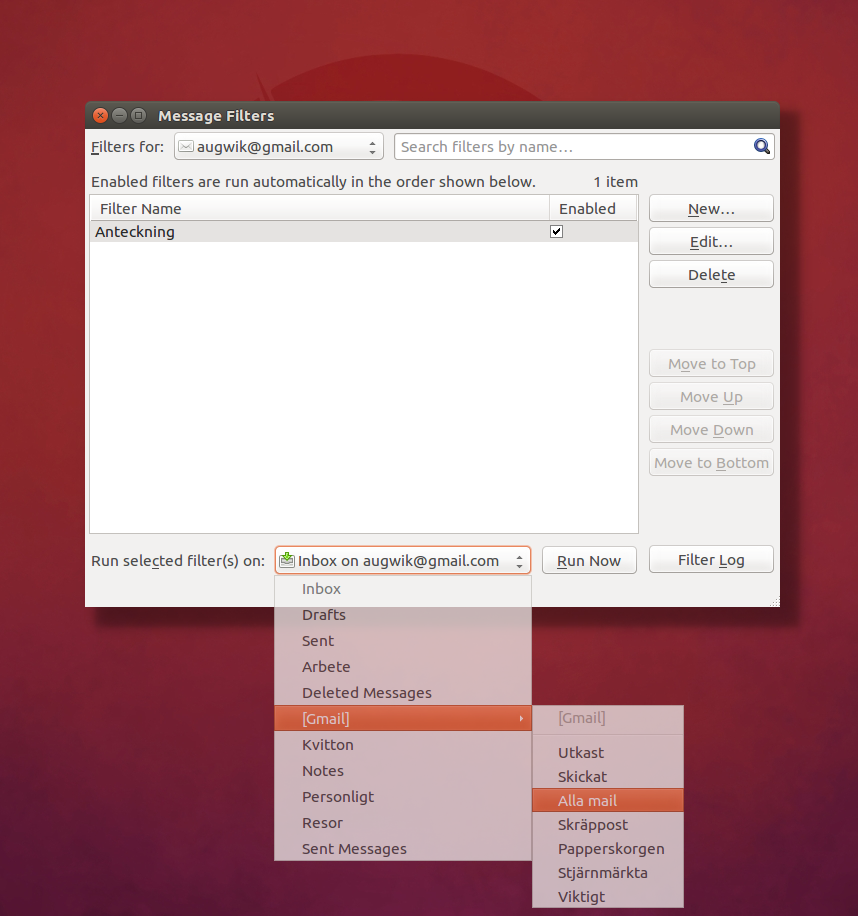
I have an app that sends my notes from my iPhone and through Message filters i was hoping to automatically tag these notes as my tag called "notes". Though for some reason these mails come to my "Gmail > All mails" folder instead of my Inbox folder, and whenever i select "Gmail > All mails" from the dropdown menu that says "Run selected filter(s) on" it just reselects the Inbox folder if i close and reopen the Message Filters folder. If i manually select "Gmail > All mails" from this dropdown menu it works so the problem isn't in my filter. Is there a way to get the filter to work in the "Gmail > All mails" folder instead of the default Inbox folder?
Pśipowjesone fota wobrazowki

Wšykne wótegrona (3)

dalšne nastajenja

You could create a filter for that folder.

dalšne nastajenja

How would i go about this?

dalšne nastajenja

Choose the folder first, then set up the message filter. It should then be specific for that folder.