


Scroll Bar does not show using Mac OS X 10.10.1, Thunderbird 31.3.0

I upgraded to Thunderbird 31.3.0, running Mac OS X 10.10.1. The scroll bars in both the inbox window and the message text window seem to have disappeared. There does not seem to be any support available on this.
Wubrane rozwězanje
Ok so you most likely have an add-on or theme that is not compatible with the current version. Check in the add-ons manager for updates. Disable all add-ons and enable one at a time until the culprit is found.
How does OSX 10.10.1 handle scroll bars. Perhaps appearing and disappearing is a new mac feature. Windows hiding menu bars is an infuriating OS feature, perhaps it is the mac users turn.
Toś to wótegrono w konteksće cytaś 👍 0Wšykne wótegrona (6)
could you post a screen shot please
Matt said
could you post a screen shot please
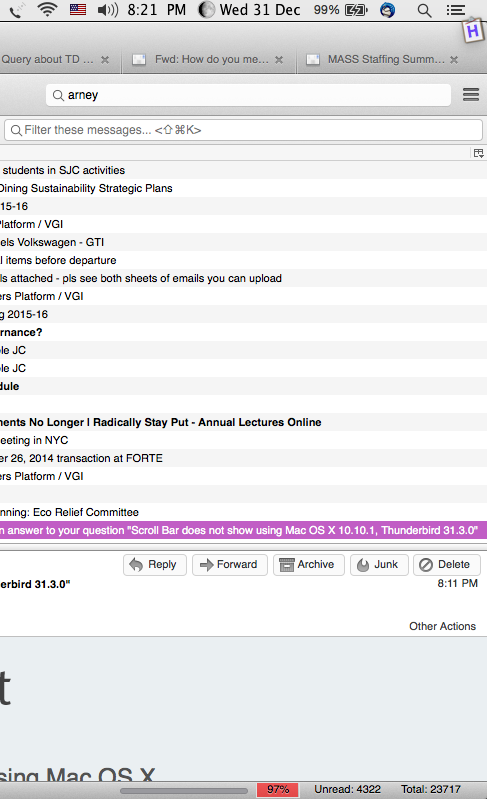
Is see, what happens if you hold the shift key while starting Thunderbird?
Matt said
Is see, what happens if you hold the shift key while starting Thunderbird?
It does make a difference, in the sense that, on my Airbook, the Scroll Bar DOES show up is I play with the Track Pad.
Thank you, for this suggestion. But if there is anyway to make the Scroll Bar more evident, I'd appreciate it.
Thanks,
Wubrane rozwězanje
Ok so you most likely have an add-on or theme that is not compatible with the current version. Check in the add-ons manager for updates. Disable all add-ons and enable one at a time until the culprit is found.
How does OSX 10.10.1 handle scroll bars. Perhaps appearing and disappearing is a new mac feature. Windows hiding menu bars is an infuriating OS feature, perhaps it is the mac users turn.
Matt said
Ok so you most likely have an add-on or theme that is not compatible with the current version. Check in the add-ons manager for updates. Disable all add-ons and enable one at a time until the culprit is found. How does OSX 10.10.1 handle scroll bars. Perhaps appearing and disappearing is a new mac feature. Windows hiding menu bars is an infuriating OS feature, perhaps it is the mac users turn.
Turns out, this is the case.
If I drag two fingers over the Track Pad, the Scroll Bar does appear. If I don't let go of the Track Pad, and roll over to the Track Bar it stays up. I hate it, but now I have a work-around.
Thank you, Matt.