


I did copy-paste places.sqlite from my old profile to new one, i got my bookmarks back, but i don't get my browsing history. I'm using firefox 26. Any idea?

My old firefox not responding quite often, so i uninstaled it, and deleted preferences lalala. But i backup my profile. And then i instal new firefox (firefox 26.) But after i copy-paste places.sqlite, i don't get my browsing history back, i only get my bookmarks back So yeah, any idea?
Ausgewählte Lösung
Did you make sure to remove all other places files?
You can check the places.sqlite database with this extension:
Try to use the SQLite Manager extension in Firefox to inspect this places.sqlite database file.
- SQLite Manager: https://addons.mozilla.org/firefox/addon/sqlite-manager/
Alle Antworten (11)
Hello, see this article, maybe help you: https://support.mozilla.org/en-US/kb/restore-bookmarks-from-backup-or-move-them
http://kb.mozillazine.org/Transferring_data_to_a_new_profile_-_Firefox
Ausgewählte Lösung
Did you make sure to remove all other places files?
You can check the places.sqlite database with this extension:
Try to use the SQLite Manager extension in Firefox to inspect this places.sqlite database file.
- SQLite Manager: https://addons.mozilla.org/firefox/addon/sqlite-manager/
After copy-paste the places.sqlite, i executed places maintenance with that addons. But then places.sqlite back to 10MB, while my old places.sqlite is 80Mb And about sqlite manager, yeah i checked it, and there are my history there, but not in firefox. But thanks anyway
Geändert am von trialanderor
Did you make sure to remove all other places files? yeah, i deleted formhistory. sqlite places.sqlite places.sqlite-shm places.sqlite-wal
I found one video about SQLite Manager: http://www.youtube.com/watch?v=y-yA7YT-7gw
Yeah, just found out how to use the sqlite manager thanks anyway
Yeah, just found out how to use the sqlite manager thanks
Yeah, just found out how to use the sqlite manager thanks
well okay never mind, i'll use my google web history then sqlite manager doesn't show me the date ugh
could you tell me how to show the "last visit date" in sqlite manager?
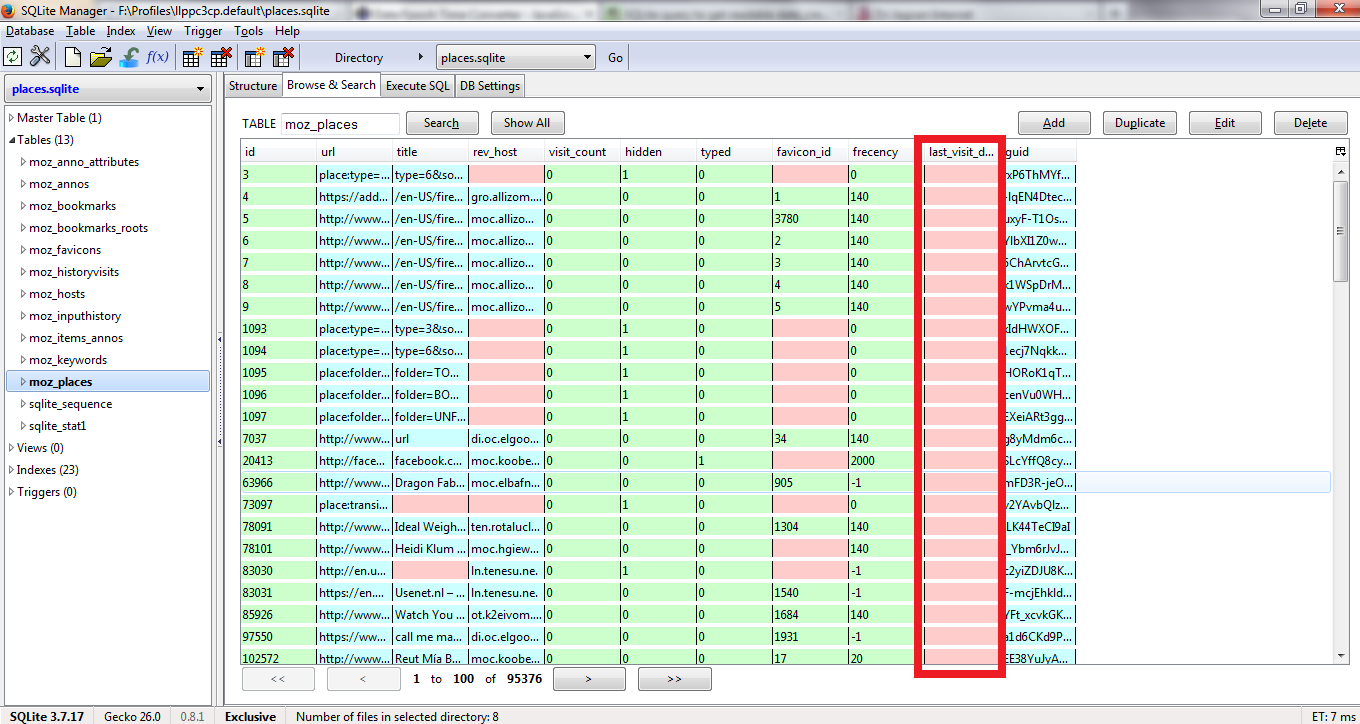
If the last visit column is empty then this means that there is no visit available, i.e. this history has been deleted or isn't kept otherwise.
That would confirm what you are experiencing and that no history is kept.
You may have to remove the file and start with a fresh places file to see if that work to store new history.
Make sure that you do not run Firefox in (permanent) Private Browsing mode (Never remember history).