


how do I delete sites in home page & history?

I entered some web addresses today & I want to be rid of them. how do I close the site so they don't appear on my home page & history?
Alle Antworten (2)
Hello
Go to History click on Clean Data of Navigation, click on OK To change you home page go to "Tools" >> "Options" >> "General" , in input "home page" type the new home page
or:
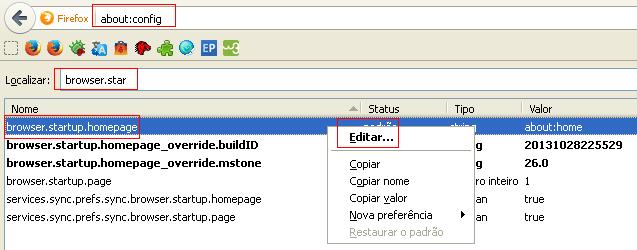
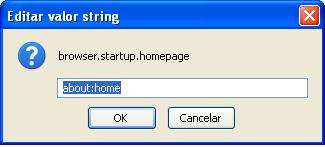
go to your address bar and type "about:config", in search bar type "browser.startup.homepage" in this option click with the right button mouse and click on edit... now you type the new home page or "about:home" to back to default home page

Geändert am von Diego Victor
In Firefox for Android, you can find the "Clear Private Data" function in the menu under Settings. So:
menu > Settings > Privacy > Clear Private Data
This should launch a list of several categories of data. History is obvious here. The sites that were in Top Sites only because they were in history will be cleared. However, bookmarks may still appear in Top Sites after clearing history.