


I get the "http://www.checkpeople.com/landing/lp-gc1a?aid=11&sid=&tid=674 site no matter what I request.

I sometimes have to request a site several times or change the search method to get the site I want. I usually use a bookmark to access a site when I get the "checkpeople" site.
Ausgewählte Lösung
Sometimes a problem with Firefox may be a result of malware installed on your computer, that you may not be aware of.
You can try these free programs to scan for malware, which work with your existing antivirus software:
- Microsoft Safety Scanner
- MalwareBytes' Anti-Malware
- TDSSKiller - AntiRootkit Utility
- Hitman Pro
- ESET Online Scanner
Microsoft Security Essentials is a good permanent antivirus for Windows 7/Vista/XP if you don't already have one.
Further information can be found in the Troubleshoot Firefox issues caused by malware article.
Did this fix your problems? Please report back to us!
Diese Antwort im Kontext lesen 👍 0Alle Antworten (2)
Ausgewählte Lösung
Sometimes a problem with Firefox may be a result of malware installed on your computer, that you may not be aware of.
You can try these free programs to scan for malware, which work with your existing antivirus software:
- Microsoft Safety Scanner
- MalwareBytes' Anti-Malware
- TDSSKiller - AntiRootkit Utility
- Hitman Pro
- ESET Online Scanner
Microsoft Security Essentials is a good permanent antivirus for Windows 7/Vista/XP if you don't already have one.
Further information can be found in the Troubleshoot Firefox issues caused by malware article.
Did this fix your problems? Please report back to us!
Try Firefox Safe Mode to see if the problem goes away. Safe Mode is a troubleshooting mode, which disables most add-ons.
(If you're not using it, switch to the Default theme.)
- On Windows you can open Firefox 4.0+ in Safe Mode by holding the Shift key when you open the Firefox desktop or Start menu shortcut.
- On Mac you can open Firefox 4.0+ in Safe Mode by holding the option key while starting Firefox.
- On Linux you can open Firefox 4.0+ in Safe Mode by quitting Firefox and then going to your Terminal and running: firefox -safe-mode (you may need to specify the Firefox installation path e.g. /usr/lib/firefox)
- Or open the Help menu and click on the Restart with Add-ons Disabled... menu item while Firefox is running.
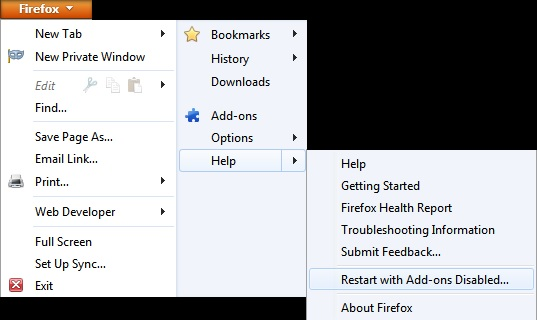
Once you get the pop-up, just select "'Start in Safe Mode"
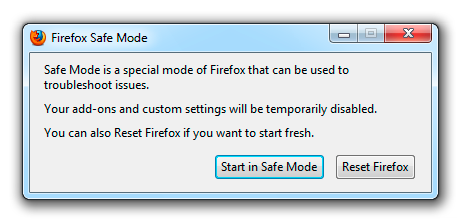
If the issue is not present in Firefox Safe Mode, your problem is probably caused by an extension, and you need to figure out which one. Please follow the Troubleshoot extensions, themes and hardware acceleration issues to solve common Firefox problems article for that.
To exit the Firefox Safe Mode, just close Firefox and wait a few seconds before opening Firefox for normal use again.
Please report back soon.