


How do I report a minor problem to Mozzila? (about spacing on ∇)

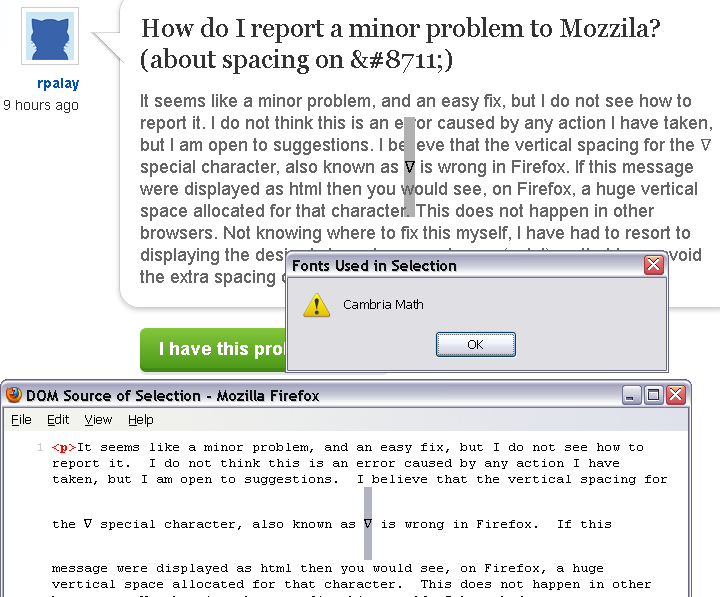
It seems like a minor problem, and an easy fix, but I do not see how to report it. I do not think this is an error caused by any action I have taken, but I am open to suggestions. I believe that the vertical spacing for the ∇ special character, also known as ∇ is wrong in Firefox. If this message were displayed as html then you would see, on Firefox, a huge vertical space allocated for that character. This does not happen in other browsers. Not knowing where to fix this myself, I have had to resort to displaying the desired character as an image (ugly!) so that I can avoid the extra spacing on the pages I produce.
Alle Antworten (9)
Sometimes these things are font-dependent. On my Windows 7 system, the character (upside-down Delta?) displays in Segoe UI Symbol and doesn't have excess space. To determine what font your system is using, you can install the add-on fontinfo from here:
https://addons.mozilla.org/en-US/firefox/addon/fontinfo/
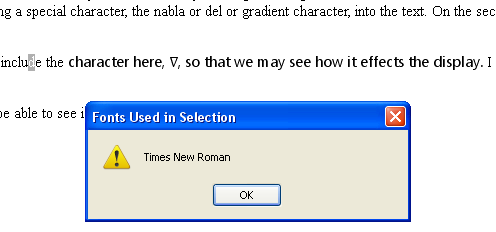
After you have it, when you select text and right-click, you can get a list of the fonts used in that selection. Hat tip to cor-el for letting me know about this extension.
Geändert am von jscher2000 - Support Volunteer
Thanks...I did install the add-on, and then I inspected the upside down delta to find that it is in Cambria Math font. That is interesting but it does not solve the problem. I expect that Firefox chooses that font for that character. So is the problem in my font on this machine or is it in Firefox and its understanding of that font? As a test I copied the test case to Word and it not only displays correctly but it shows the specific character in Cambria Math font. Sounds like the font is OK. So there error is in ....
Firefox may have a problem with that font. Did you get it with Office 2007 or Office 2010? I have an XP system with Office 2007 I can look at later to see whether that configuration has the same issue.
By the way, I have hardware acceleration disabled, which can affect some fonts. This might not be relevant to you, but it depends on your graphics card. You could try disabling graphics hardware acceleration to see whether it makes a difference.
First, save all work (e.g., mail you are composing, online documents you're editing, etc.).
orange Firefox button or classic Tools menu > Options > Advanced
On the "General" mini-tab, uncheck the box for "Use hardware acceleration when available"
OK out of Options and restart Firefox. Does it make any difference?
On my Windows XP system, if I select the character, I can see that it has a huge space above and below, but this does not distort the line for some reason. You can see the problem in the source viewer, but not here in the forum. ???
For what it's worth, I don't use ClearType, either.
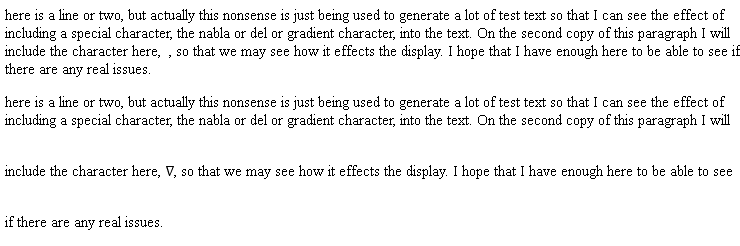
On this site, the support page, the character displays appropriately bu if I highlight it then the highlight extends way above and below that character. It is on a plain vanilla html page that I get the spacing error. This is the test text: <title>Document Title</title> here is a line or two, but actually this nonsense is just being used to generate a lot of test text so that I can see the effect of including a special character, the nabla or del or gradient character, into the text. On the second copy of this paragraph I will include the character here, , so that we may see how it effects the display. I hope that I have enough here to be able to see if there are any real issues.
here is a line or two, but actually this nonsense is just being used to generate a lot of test text so that I can see the effect of including a special character, the nabla or del or gradient character, into the text. On the second copy of this paragraph I will include the character here, ∇, so that we may see how it effects the display. I hope that I have enough here to be able to see if there are any real issues.
I tried to add the image of the screen that I get from displaying that page in Firefox on mt XP machine.
Tried it...made no difference. By the way, the problem does not exist with Explorer, Opera, or Chrome on this machine. Nor does it exist on my Windows 7 machine, although, following your earlier tip, when I inspect the font on that machine it says that Firefox used the Segoe font. Still, given that the Cambria font works in Word, I still do not see how the font is at fault. Still open for any and all suggestions...it is a minor problem, using the image is a reasonable workaround, but it is an irritant. Thanks again for the help. Rog.
I'm not sure what you mean by a plain vanilla HTML page. You might compare the "Page Info" dialogs for this page and your page. Right-click the page and View Page Info. I would expect some similarities:
Type: both pages should show "text/html"
Render Mode: there might be a difference between Standards mode and Quirks mode. I'm not sure whether that could affect the display of fonts.
Encoding: this site uses "UTF-8" which I think you would also want to use in your page. It can be sent in an HTTP header from the server or encoded as the first tag in the <head> section:
<meta http-equiv="content-type" content="text/html;charset=UTF-8">
Are you seeing any differences?
Including <meta http-equiv="content-type" content="text/html;charset=UTF-8"> did not make any difference. Also, I thought specifyning the font might help, but that only raised further questions. In the three attached images you can see that I have specified the Segoe UI font for the text aroung the nabla character, but that character remains in Cambria. Go figure. Then, looking at another character in the Segoe font, it also shows the large vertical spacing. However, the normal character in the third figure shows normal spacing. As you might expect, if I just get rid of the nabla character, then all the text comes out normally spaced.
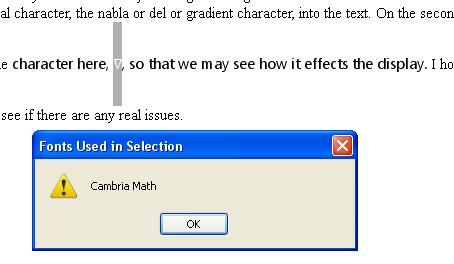
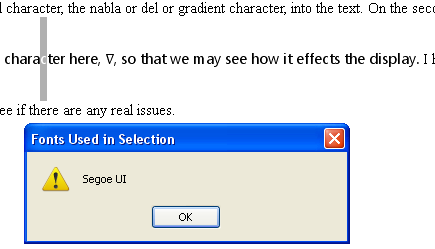
Does that happen with all characters in that font?
- http://en.wikipedia.org/wiki/Unicode_Mathematical_Operators
- http://www.alanwood.net/unicode/mathematical_operators.html
See also: