


Cant update to latest version, i'm still using 3.6 and was unaware beliving i had downloaded succesfully

Question I haven't been able to undate my firefox successfully, i'm still using 3.6. I was only made aware of this recently from my bank as i was having issues with internet banking. I believed that everytime i downloaded the latest version it had been a success because it came up on my screen that download had been successful. I never paid attention to the notice on the search page that you are not using the latest version of firefox, si i wasn't aware and at times that i did read it i would go to site and download the latest and it would always say download was successsful, so i just assumed all was fine. I need help to change this i can never seem to find your live chat open. I though of unoinstalling and starting all again but i don't know how to save my bookmarks. I'm not that computor savy and it would be much easier for me to talk to someone to help me, how is this posssible.??
Ausgewählte Lösung
According to your system details which are detected when you post here, you're using Firefox 6.0.2 (on Windows Vista), which is the latest version of Firefox. So don't worry about that.
If your homepage is http://www.google.com/firefox , then that's an error in the version detection on that page. The default homepage is different on newer versions. So go to https://support.mozilla.com/en-US/kb/How%20to%20set%20the%20home%20page#w_restore-the-default-home-page for instructions on how to restore the default home page.
Diese Antwort im Kontext lesen 👍 0Alle Antworten (4)

Ausgewählte Lösung
According to your system details which are detected when you post here, you're using Firefox 6.0.2 (on Windows Vista), which is the latest version of Firefox. So don't worry about that.
If your homepage is http://www.google.com/firefox , then that's an error in the version detection on that page. The default homepage is different on newer versions. So go to https://support.mozilla.com/en-US/kb/How%20to%20set%20the%20home%20page#w_restore-the-default-home-page for instructions on how to restore the default home page.
Can you look up something?
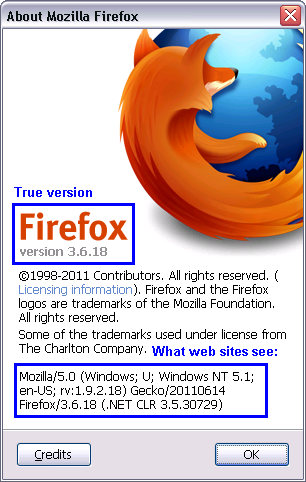
Open the About Firefox dialog from the Help menu.
If you have Firefox 3.6, there will be version information listed both at the top and the bottom, as shown in the attached. What do you have for those?
If your About Firefox dialog looks very different than this, you probably have a newer version. To get the detailed information, open Help > Troubleshooting Information. What do you have for the second and third rows (Version and User Agent)?
Geändert am von jscher2000 - Support Volunteer
Thanks for that. So I am actually using firefox 6.0.2, great. I shall restore the home default page as you suggested........ So having done that i still get on the start up page that i'm not using the latest version of firefox and when i click on support it goes to a page briefly which say's *warnings you are still using firefox 3.6* then this page quickly disappears before i can read anymore and then the support page appears quickly. Am i to understand that this isn't a problem and not to worry about it thanks Elisa
Geändert am von elisamora
Hello Again, after shutting down and opening again the start up page is now different, in fact everything looks different, more like it should look I'm assuming. However when i click on the support link i still get this page quickly that starts with "warning you are using 3.6 blah blah something else blah blah about using an insecure version", don't get enough time to read it properly before it goes to the help page. It seems strange but other than that everything seems just fine. Thanks Again Elisa
Geändert am von elisamora