How do I prevent Firefox from automatically starting when I boot-up my Mac in the morning?

Whenever I boot up my Mac in the morning Firefox automatically starts and displays my home page. I would only like to see the desk top with no applications running. I am running OSX 10.4.11 on my laptop.
== Started possibly a few weeks ago.
Alle Antworten (3)
This is something that started with the latest version of firefox. I'm very disappointed in mozilla on this one. This is a shameless attempt to gain browser market share. I hope that mozilla wakes up and removes this from the next update or people will start moving onto google chrome.
Click on the link below to learn how to stop this.
http://www.wikihow.com/Stop-an-Application-from-Opening-at-Startup-With-Mac-OS-X
Geändert am von zadmiral2
I'm not sure about it being a shameless ploy, but that link, while a good first step doesn't solve this problem for me. There is no firefox object in my startup items to even remove..
I've tried digging through about:config to see if I could find anything there but with little luck. Perhaps someone with a better handle on the config screen could do a bit more digging..
For the record, my machine is a brand new powerbook with OSX Lion 10.7.2 and a fresh install of Firefox 9.0.1
Hmm.. Okay I've done a bit more digging and tried the following two things before the last restart.. Not sure which one actually worked but give these a shot (one at a time) and let us know which is the actual solution! :)
1. Open Safari -> Preferences -> General
- change "Default Web Browser" to Safari
- Close all applications
- Relaunch Safari and change default browser back to Firefox.
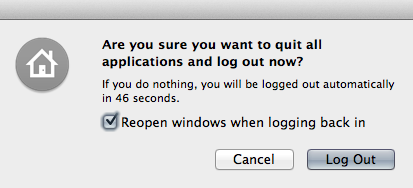
2. Remove the check from "Reopen windows when logging in" in the logout dialog and logout of the computer..
I suspect step 2 is actually the proper solution, but I did both so, hopefully one of them works for everyone else!