


In Windows 11, I have two Spam folders. How do I get rid of one?

After I set up my IMAP account on a Windows laptop, it had two Spam folders. Properties showed that the path of one ended in "/Junk" and the other path in "/spam". Note that they are both labeled "Spam" under the Home (not local) Inbox.
I just want one Junk or Spam folder, not both. Or at least be able to label one Junk and the other Spam.
Having two spam folders under the Home account with the same name is confusing. How do I fix it.
Ausgewählte Lösung
Todd,
Thank you for your suggestions.
The confusion was there were two folders labeled Spam. But one was added by ThunderBird and it's path name ended in "/Junk", the other was "added" by my email host and the path ended in "/spam". I kept trying to unsubscribe to the one my host added, but it would just be added back. Finally - after a night's sleep - I realized what was happening and just unsubscribed to the Spam folder that had the path ".../Junk".
That disappeared one of the two Spam folders so now I only have one and my setting point all designated Spam/Junk mail to that one.
Problem solved.
Alle Antworten (6)
See if this helps:
- Settings > General
- scroll to bottom and click on 'Advanced Settings' button (used to be called 'Config Editor')
- In search type: mail.use
- look for : 'mail.useLocalizedFolderNames'
- if it says 'true' use the toggle icon on the right to select false.
Exit Thunderbird and allow a few moments for background processes to complete, then start Thunderbird.
Hopefully changing the setting will show one as Junk and one as 'Spam'
Now check:
- Account Settings > Spam Settings ( recent versions will say 'Manage Spam') for the account
- Under 'Storage and deletion'
- Select 'Move new spam messages to'
- Select 'Other' and choose 'Spam on mail account name'
I suggest you select 'Spam' because it's likely that is the folder used by the server. If you logon to the webmail account, you would be able to check if 'Spam' was the default used by server.
Ausgewählte Lösung
Todd,
Thank you for your suggestions.
The confusion was there were two folders labeled Spam. But one was added by ThunderBird and it's path name ended in "/Junk", the other was "added" by my email host and the path ended in "/spam". I kept trying to unsubscribe to the one my host added, but it would just be added back. Finally - after a night's sleep - I realized what was happening and just unsubscribed to the Spam folder that had the path ".../Junk".
That disappeared one of the two Spam folders so now I only have one and my setting point all designated Spam/Junk mail to that one.
Problem solved.
I have a similar problem. There is a phantom Spam folder stuck in Trash that respawns when I restart TB. What kind of strategy would I use to get rid of it? I've tried repairing the Trash folder without success.
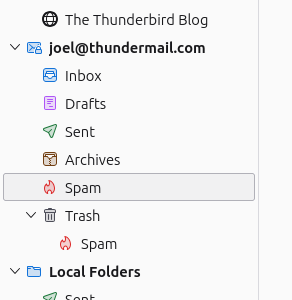
Joel - first you need to provide more details. Are you on a Mac or a PC? What operating system version are you using? Where are you getting your email? Is it a private Host, like QTH.com, or one of the common sources like gmail.com or Yahoo.com?
All those details point to different situations.
In my case, the standard TB configuration provided a Spam folder that at one time was called "Junk". When I right-clicked it, viewed its properties, and checked the path, it ended with "/Junk".
But my email host's software also added their own spam folder. Its path ended in "/spam".
I kept trying to unsubscribe from THAT spam folder (unsubscribe is a right-click on the Home account), but because it was created by my email host, it kept reappearing. Then I realized I should be unsubscribing from the spam folder that came with the TB setup. When I unchecked that (unsubscribed), that folder went away, so I then only had one - the one my Host creates. I checked Spam Management and made sure the checkboxes routed any spam email to the remaining spam folder under the Home account.
So my solution depended on the situation that I was working on a Windows 11 Pro PC and Laptop. And that I had an emial host for my quickdata account. And that the host's software (Spam Assassin) would identify potential spam, but - as agreed by me - would send it to me anyway, identified as spam, because sometimes legitimate email gets mistakenly labeled spam.
Your mileage may vary. Good Luck.
I am not a Windows person; I just have them for occasional compatibility issues. And I'm not a network person. I just saw that though both folders were named "Spam", they had different paths. And I'm used TB long enough that I remembered the Junk Folder. And googling gave me a hint that the second spam folder was being created by my email host. I spent an hour or so trying to delete that one (the unsubscribe action), before I realized I should be unsubscribing form the "/Junk" path spam folder and keeping the other.
That worked--thanks! I've been using TB since forever and never was aware of the "subscribe" functionality. You learn something new every day...