


Offen
How do I search for bounced emails by sending server Message-ID?

It appears this method below only works for the received Message-ID, but I need to search for the sending server Message-ID in a bounced email. Or perhaps a simple plain text search of the entire contents shown when I open View Source?
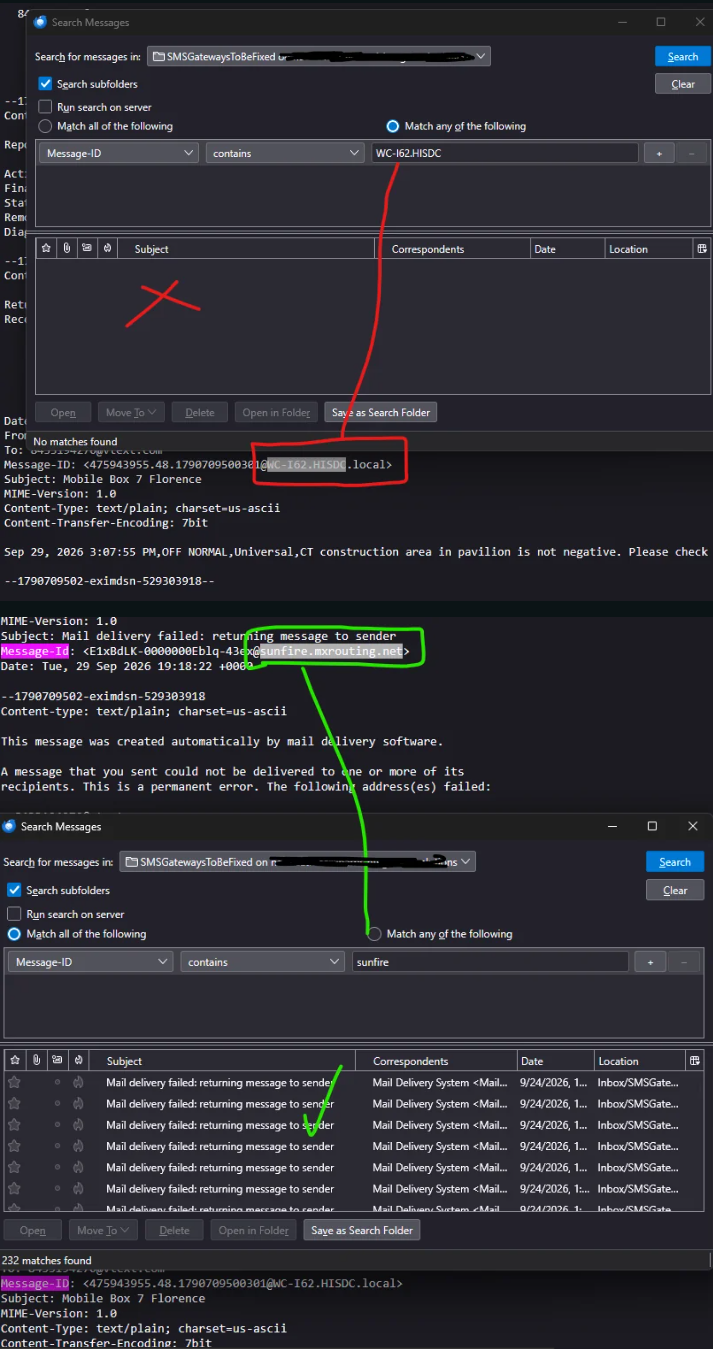
I can see it there as pictured below, how do I use search to find all emails with that in the header?
Reference these instructions; https://discourse.mozilla.org/t/how-to-search-for-an-email-using-its-header-message-id/107377/2
Basically I have a variety of sending servers that are bouncing back to me and I want to know who is responsible for which messages. I can manually find that by viewing source on each email no problem, but want to search all and get all at once.
It appears this method below only works for the received Message-ID, but I need to search for the '''sending server Message-ID''' in a bounced email. Or perhaps a simple plain text search of the entire contents shown when I open View Source?
I can see it there as pictured below, how do I use search to find all emails with that in the header?
Reference these instructions; https://discourse.mozilla.org/t/how-to-search-for-an-email-using-its-header-message-id/107377/2
Basically I have a variety of sending servers that are bouncing back to me and I want to know who is responsible for which messages. I can manually find that by viewing source on each email no problem, but want to search all and get all at once.
Alle Antworten (1)
Not possible in thunderbird?