


Windows 10 reached EOS (end of support) on October 14, 2025. If you are on Windows 10, see this article.

Hilfe durchsuchen

Vorsicht vor Support-Betrug: Wir fordern Sie niemals auf, eine Telefonnummer anzurufen, eine SMS an eine Telefonnummer zu senden oder persönliche Daten preiszugeben. Bitte melden Sie verdächtige Aktivitäten über die Funktion „Missbrauch melden“.

Weitere Informationen
Offen

Can't get rid of "Add Security Exception" pop-up

ian266

Sometime ago, when I was regularly using more than one computer, I thought I'd found a way to have my Thunderbird address book centrally located and accessible from both computers. I got no success from attempting this, but have suffered some side-effects every since. Configuring Thunderbird back then somehow involved using the location "demo.sogo.nu" and I believe it related to a security certificate. What used to happen was, soon after rebooting the computer, I'd get a couple of pop-up messages about connecting to demo.sogo.nu that I could clear away easily. Recently, something changed regarding this certificate and I now get pop-ups (screenshot attached) that continually bother me to create a security exception. I want these gone! I've gone into the Certificate Manager and can't find anything under the Server tab to delete. One other clue is a second screenshot that I discovered somewhere in Thunderbird that actually shows the *.sogo.nu certificate - but offers no way to delete it! Can anyone give me a hand? My only alternative is to literally annihilate Thunderbird and start from scratch, but I really don't want to go there.
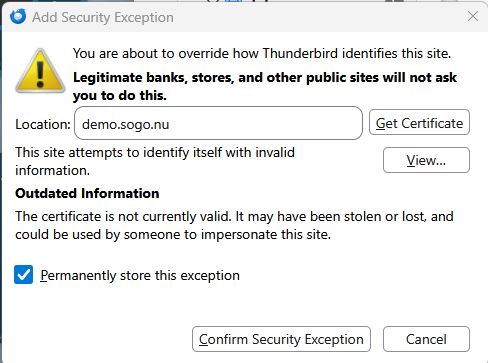
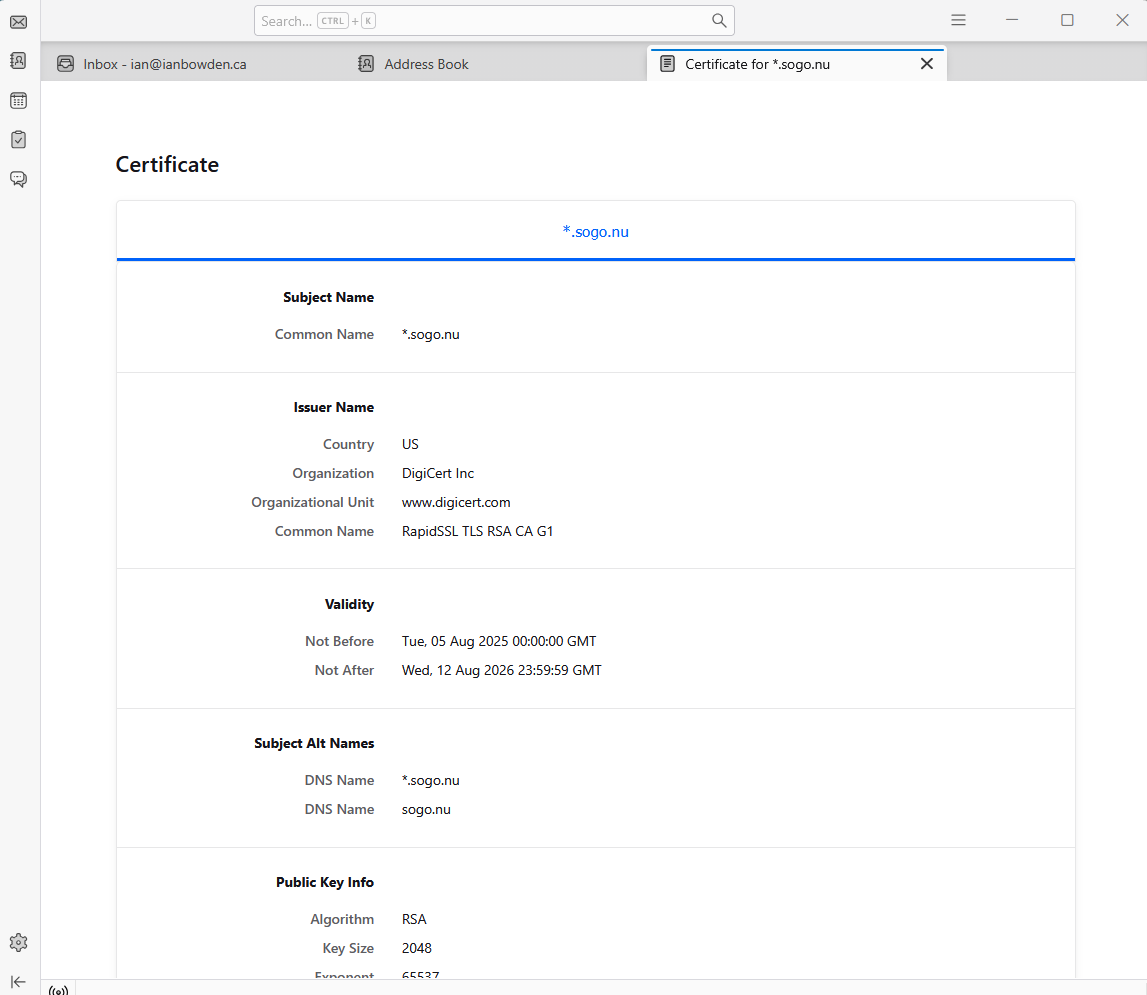
Sometime ago, when I was regularly using more than one computer, I thought I'd found a way to have my Thunderbird address book centrally located and accessible from both computers. I got no success from attempting this, but have suffered some side-effects every since. Configuring Thunderbird back then somehow involved using the location "demo.sogo.nu" and I believe it related to a security certificate. What used to happen was, soon after rebooting the computer, I'd get a couple of pop-up messages about connecting to demo.sogo.nu that I could clear away easily. Recently, something changed regarding this certificate and I now get pop-ups (screenshot attached) that continually bother me to create a security exception. I want these gone! I've gone into the Certificate Manager and can't find anything under the Server tab to delete. One other clue is a second screenshot that I discovered somewhere in Thunderbird that actually shows the *.sogo.nu certificate - but offers no way to delete it! Can anyone give me a hand? My only alternative is to literally annihilate Thunderbird and start from scratch, but I really don't want to go there.
Angefügte Screenshots

Alle Antworten (1)

The cert for demo.sogu.nu has expired on August 12 2026, hence the exception prompt. Talk to your email provider, they'll have to renew their cert.

Stellen Sie eine Frage

Sie müssen sich mit Ihrem Benutzerkonto anmelden, um auf Beiträge zu antworten. Bitte stellen Sie eine neue Frage, wenn Sie noch kein Benutzerkonto haben.