


can't find "compose new message" button when I open my Thunderbird email

I can't find the "compose" button that used to be on the "home page" of my Thunderbird email. HELP! It shouldn't be so hard to perform a simple task but something has changed and I can't figure it out.
Alle Antworten (2)

A screen shot of your Thunderbird window, and an indication of where you expect the Compose button to be would be helpful,
The toolbars are customizable. I'm guessing you may just need to add the button to the toolbar. This article describes how to do that:
https://support.mozilla.org/en-US/kb/unified-toolbar
In the meantime, you can always create a new message from the menu option <File | New | Message>, or press <Ctrl+N>. If the menu is hidden, hit <Alt> or F10 to reveal it.

One of the possibility is : click on View ( or Press <Alt> key + v ) , and then select Folders, and then Folder Pane Header
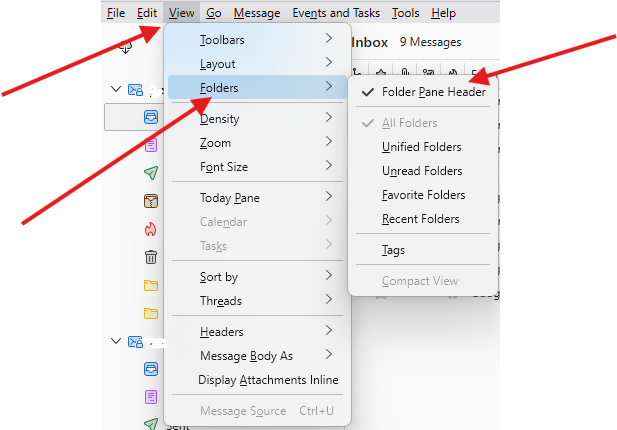
Geändert am von Michel T