


Disable Thunderbird Account Hub

I am trying to add an Proton mail account to Thunderbird using the Proton Mail Bridge (PMB). In the PMB guide it is recommended to uncheck Account Hub in the Setting>General. The problem is that the Account Hub still pops up when trying to add a new mail account - it simply refuses to go away regardless of several restarts of both the computer and the mail client!
Alle Antworten (8)
That is by design, not a bug. If you're unable to add the account, you could file a bug at https://bugzilla.mozilla.org/enter_bug.cgi/. If you do, please post the link to it here.

Ed said
That is by design, not a bug. If you're unable to add the account, you could file a bug at https://bugzilla.mozilla.org/enter_bug.cgi/. If you do, please post the link to it here.
Ed, do you mean that, by design, the account hub is used to set up accounts even when it is disabled? Why would that be? It is not my experience.
It was a bug. Disabling the hub in the interface didn't actually disable it. Still doesn't, but a new option has been added: TB menu > Settings > General > Account Hub > Use the new manual configuration flow in Account Hub. Enable that in one of your existing accounts and try to add the new one again.
Geändert am von Ed
UNRESOLVED
As of 2026-11-05, still unable to Disable Thunderbird Account Hub as the 1st step in setting Proton Email account for Sync.
Access to "Disable Thunderbird Account Hub" using the navigation path provided in the 6/14/26 (above), does not exist. "Account Hub" not found under: TB menu > Settings > General > .
Thunderbird version 152.0 is install in a Windows 11 desktop environment .
SECONDARY ISSUE
After going through the effort of saving several screen captures into a PDF format, to document the absence of "Account Hub" within the TB menu > Settings > General > navigation path, I am unable to attach it as an upload for support reference. Only a IMG file is allowed. Seriously????
Last comment. I am in the process of migrating all email clients to one email client and this is the first. Pending the outcome of this issue, Thunderbird may or may not be that email client.

The Account Hub setting is found in <Settings | General>, as it has been for years. See the attached image.
You are correct, only images can be added to messages in this forum. JPG and PNG may be the only formats allowed, PDF definitely not.
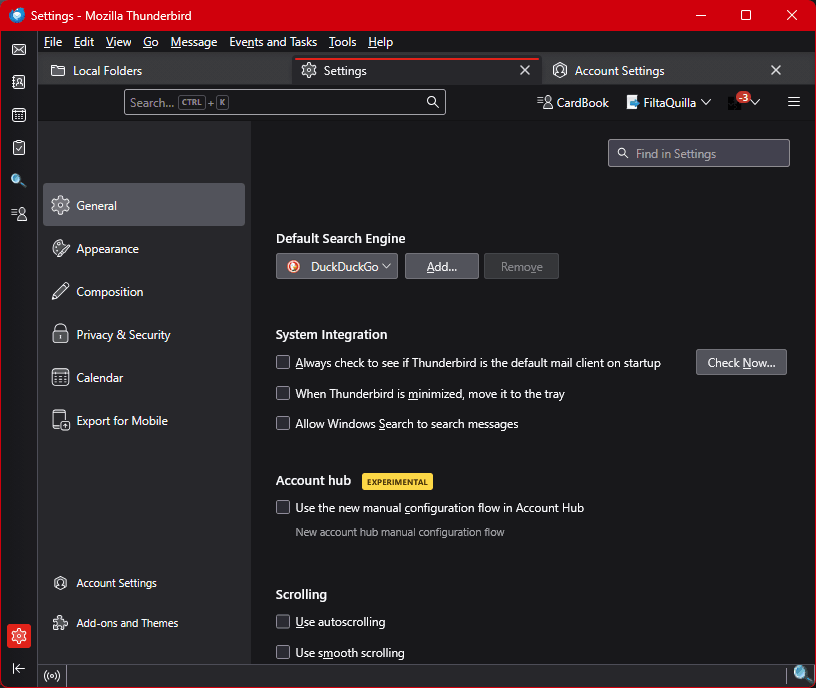
There is no longer a setting or config option to disable the Account Hub, as it was deactivated six months ago.
Ed said
There is no longer a setting or config option to disable the Account Hub, as it was deactivated six months ago.
Interesting! I'm still on the latest esr release, where it continues to live. I'll miss the 'deactivate' switch, which sometimes made it easier to troubleshoot certain things.
I see they shuffled some of the other furniture, such as "compact all folders when it will save over [x] MB" is now called "Remove data from folders when they have already been deleted to free up storage" which to me is more ambiguous.
Geändert am von Lin
Lin said
Ed said
There is no longer a setting or config option to disable the Account Hub, as it was deactivated six months ago.Interesting! I'm still on the latest esr release, where it continues to live. I'll miss the 'deactivate' switch, which sometimes made it easier to troubleshoot certain things.
I see they shuffled some of the other furniture, such as "compact all folders when it will save over [x] MB" is now called "Remove data from folders when they have already been deleted to free up storage" which to me is more ambiguous.
I misspoke. There still is a setting in 153esr, but the config option (mail.accounthub.enabled) no longer exists. And there still is a setting and config option in 140esr; IDK if it's actually usable.