


Gelöst
unable to receive e-mails. can not send out messages

unable to receive e-mails. can not send out emails.
unable to receive e-mails. can not send out emails.
Alle Antworten (4)
Ausgewählte Lösung
To get assistance, I suggest posting complete error messages and screnshots of server settings pane and the SMTP server settings pane. That would at least be a start. thank you. I included a screenshot of where to do those screenshots.
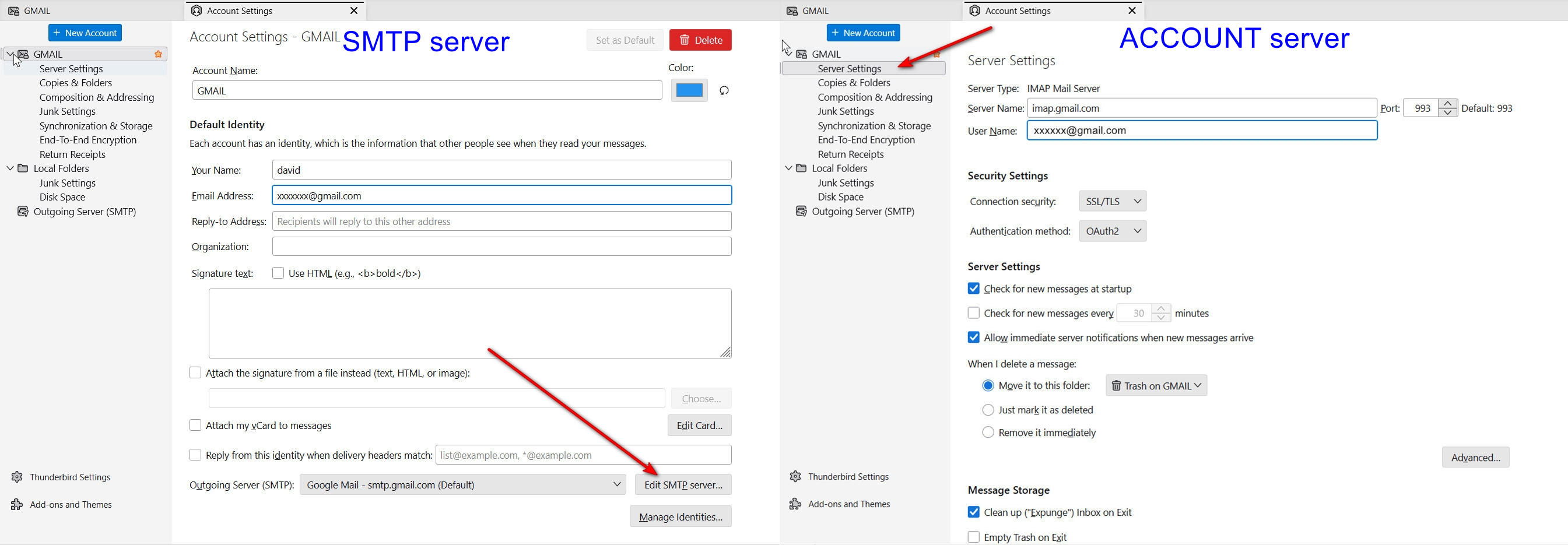
How do I do a screen shot from a PC desk top. ?
How do I do a screen shot from a PC desk top. ?
Lots of options:
https://support.microsoft.com/en-us/windows/use-snipping-tool-to-capture-screenshots-00246869-1843-655f-f220-97299b865f6b Windows has the ability to do that. Here are the steps: If you are unfamiliar with creating screenshots, Windows has a tool for that.
- click the Windows key and the shift key and the letter 's' - a window opens over what is on screen
- leftclick mouse and drag down and to right to highlight the area
- when you release the mouse button, the screen will be in windows clipboard
- on the forum page where you respond, press cntl and 'v' to paste in
SCREENSHOT ALTERNATES:
- https://www.reasyze.com/ small, free, and simple