


Messages from local folder seem to be deleted - help

New user - I recently moved thousands of messages from my inbox to a local folder.
At some point, Thunderbird asked me to compact folders and I said yes. I noticed today that I am now missing about 13 years worth of messages from my local inbox folder.
Since I moved them, it deleted the messages out of the original inbox (I also logged into that account via the web and they are not located in the trash on the server either). There are now only a handful of messages there.
Does compacting mean that messages are deleted? Everything else I read said specifically that it would NOT delete messages. Any tips on how I can recover some really important messages? (It deleted about 13 years worth of messages from early May 2026 back to mid-2013, so there are recent messages in there I really need!).
Steps already taken: I tried using "repair folder" and that did not work. I do not have any automatic filters set up. I tried locating my Profile, and moved the "msf" files to my recycling bin, as I read that deleting the msf file would rebuild the index and display emails that had disappeared. Nothing changed. This was new for me so perhaps I did something wrong? I haven't emptied the recycling bin yet so the files are easily retrievable if necessary.
Alle Antworten (2)
I presume this was an IMAP account. Moving from server to local storage, regardless of email client, can be problematic, since the network itself is involved. A transfer may contain message headers, but not the message content. Better to COPY to local folders so that you can verify content. I suggest restoring the recycle bin, verifying the message content is there, and then COPYing to local folders, and then rechecking. Personally, I have doubts on the trash folder, but am hoping for success. :)
laurenmb5678 said
New user - I recently moved thousands of messages from my inbox to a local folder. At some point, Thunderbird asked me to compact folders and I said yes. I noticed today that I am now missing about 13 years worth of messages from my local inbox folder.
Did you move those messages from your Inbox folder to a new folder you created manually in your Local Folders? Whether you moved or copied messages from your Inbox to that local folder they should still be stored there. And even if you moved them from an IMAP Inbox to a local folder those messages should still be present in the local folder. Did you verify its contents?
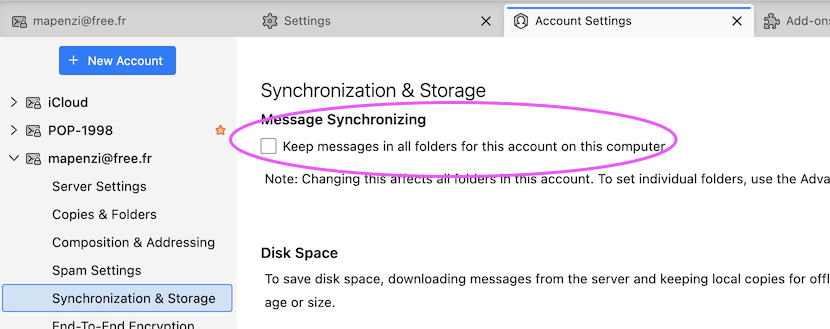
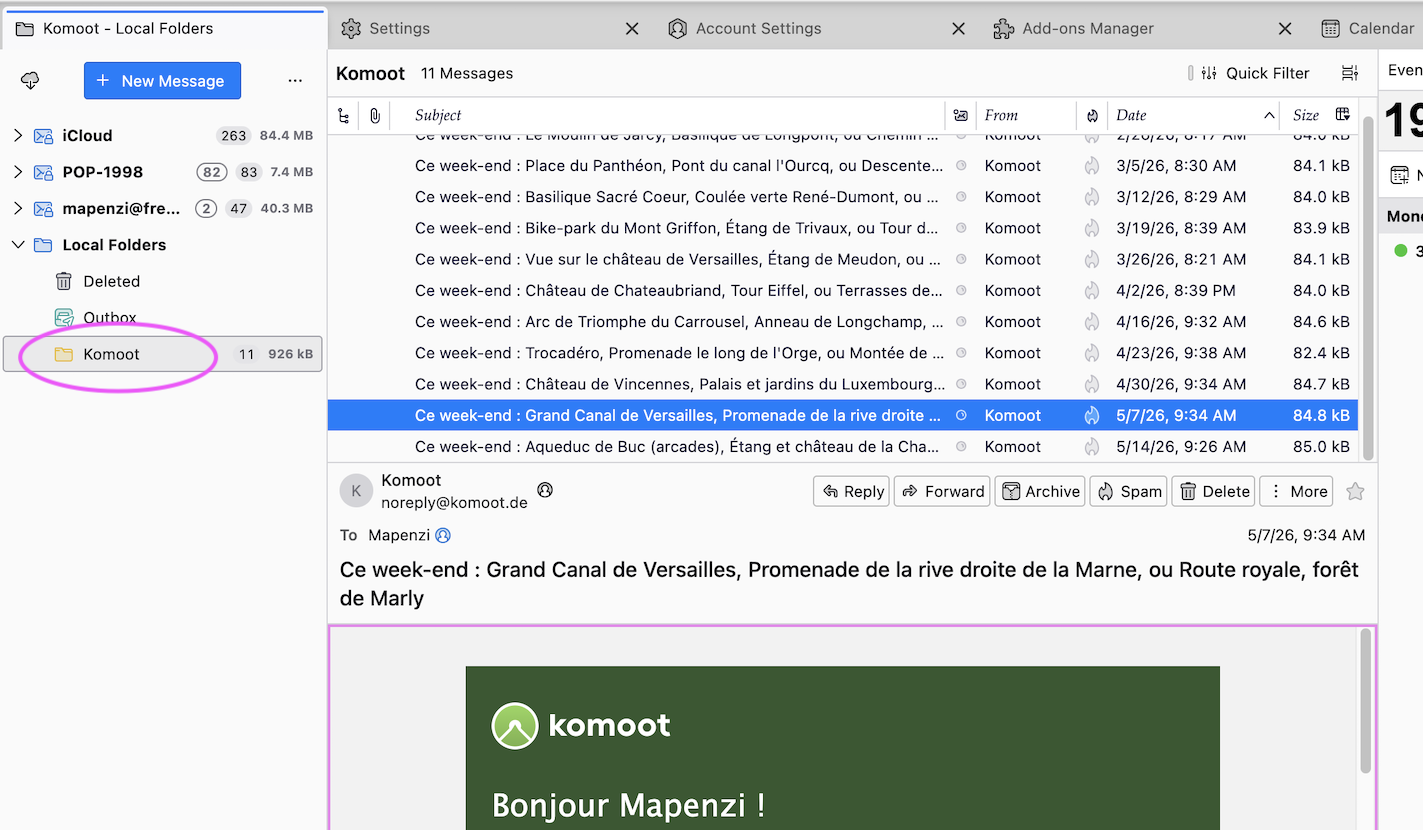
I just tested your supposed moves in one of my Thunderbird profiles: • an IMAP account for which I disabled ⬜ "Keep messages in all folders for this account on this computer" in Account settings > account name > Synchronisation & Storage > Message Synchronising ...(see first image) • then I created a new folder "Komoot" in my Local Folders • in my IMAP Inbox I selected all messages I'd received from Komoot, right-clicked on the selection and chose "Move to > Local Folders > Komoot • all selected messages were moved to folder Komoot in Local Folders (see second image) and had subsequently disappeared from Inbox
Let's suppose you moved messages from an Inbox in a POP account to Local Folders. In that case the messages would be stored in the folder in Local Folders and disappear from the Inbox. But the moved messages would still be stored in the Inbox file in your Thunderbird profile folder unless you compact the Inbox folder >>>> https://support.mozilla.org/en-US/kb/compacting-folders So I still don't understand why your moved messages would no longer be stored in that local folder in your Local Folders ...
Geändert am von Mapenzi