Windows 10 reached EOS (end of support) on October 14, 2025. If you are on Windows 10, see this article.

Hilfe durchsuchen

Vorsicht vor Support-Betrug: Wir fordern Sie niemals auf, eine Telefonnummer anzurufen, eine SMS an eine Telefonnummer zu senden oder persönliche Daten preiszugeben. Bitte melden Sie verdächtige Aktivitäten über die Funktion „Missbrauch melden“.

Weitere Informationen
Gelöst

I can't send a message from a shared email

sergey

Good afternoon.

The message was composed using a translator I have 3 mail for work. 1 personal, 2 shared There are no problems with my personal email. I can't send messages from two other emails, and I get an error

Error translation "Error sending message. Error sending mail. Mail server responded: Error: send AUTH command first. 1777978756-Gxds2c0SZiE0-r8k7j8Ju. Make sure the email address you specified in your account settings is correct and try again."
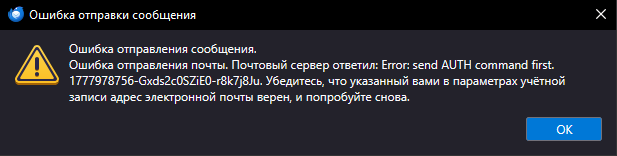
Good afternoon. The message was composed using a translator I have 3 mail for work. 1 personal, 2 shared There are no problems with my personal email. I can't send messages from two other emails, and I get an error Error translation "Error sending message. Error sending mail. Mail server responded: Error: send AUTH command first. 1777978756-Gxds2c0SZiE0-r8k7j8Ju. Make sure the email address you specified in your account settings is correct and try again."
Angefügte Screenshots
Diese Antwort im Kontext lesen

Ausgewählte Lösung

Thanks for the feedback. I'm glad all is well. :)

Alle Antworten (4)

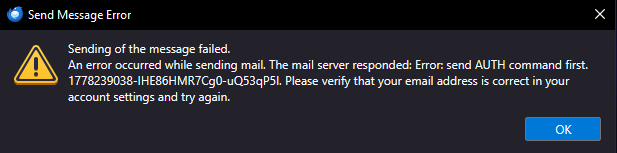
Please translate the error message completely. It may help to also share screenshots of incoming server settings pane and SMTP server settings pane.

I changed the language to English to take a screenshot of the error in English, and the error is gone. After changing to Russian, it doesn't appear. Everything works, I don't know how this happened.

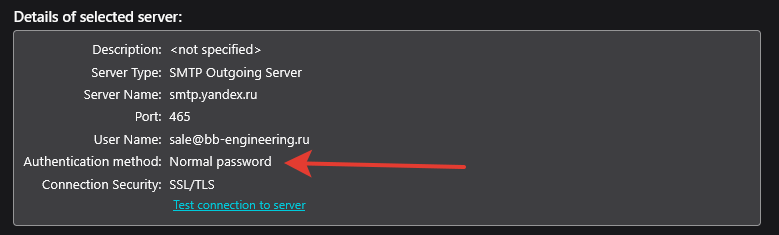
I found the cause of the error. This field was empty by default.
Ausgewählte Lösung

Thanks for the feedback. I'm glad all is well. :)

Stellen Sie eine Frage

Sie müssen sich mit Ihrem Benutzerkonto anmelden, um auf Beiträge zu antworten. Bitte stellen Sie eine neue Frage, wenn Sie noch kein Benutzerkonto haben.