


Lost Thunderbird Local Folder

One of my local folders of email disappeared: it is no longer displayed under Local Folders. A few days ago while using my mouse to move a message into one of the local folders, something happened, a peculiar message briefly displayed. At the time I did <Ctrl>-Z to undo whatever happened, but I didn't see any changes. That must be when the folder disappeared, but I'm not sure.
My other folders are still in place. I can't find the missing folder inside any of the other folders (junk, deleted, archive, etc.). Yet when I search for email in one of the missing folders, the messages are found. When I go into Troubleshooting Information, there is no Profile Directory listed, and when I click on the Open Directory button, nothing happens. (I've gone through the process of transferring Thunderbird accounts to new computers in the past.) I'm using Pop!_OS 22.04 Linux and Thunderbird 140.10.0esr. I backup my laptop using Back In Time. Any idea how can I fix this?
Ausgewählte Lösung
Thunderbird on my laptop is a flatpak installation, which might be why the profile location is not listed on the Troubleshoot page. Unfortunately flatpak is not as completely integrated into the OS like debian installs, but was preinstalled with the OS and not my choice. After hunting around, I found the profile under "Home/.var/app/org.Mozilla.Thunderbird/.thunderbird". I did not find my "Business" folder in the collection of other mail folders. However, I did a search as you suggested and it was listed under another mail folder. When I checked Thunderbird, it seems I had inadvertently moused the folder into another one as a sub-folder. So, I simply drag-and-dropped it back to its proper location. When I originally checked for that possibility I missed it for some reason. Dummy me. The message that probably originally told me that came and went so quickly that I couldn't read it. Thanks for your help!
Diese Antwort im Kontext lesen 👍 1Alle Antworten (2)
I can't explain why the Open Profile Directory button doesn't work. Sounds like an OS issue to me, but be that as it may...
I don't know Pop OS, but in Linux Mint, the default location of the Thunderbird Profiles is </home/(your user home dir.)/.thunderbird/>. In Ubuntu, which installs apps as Snaps, the Profiles are </home/(your user home dir.)/snap/thunderbird/common/.thunderbird> So you can use your file browser and look there for your missing folder file. It should be somewhere in the <Mail/Local Folders> sub-folder of your profile, but if you moved it it could be elsewhere. If you have a file search utility, you could search for the file itself, which should have the name you originally gave it.
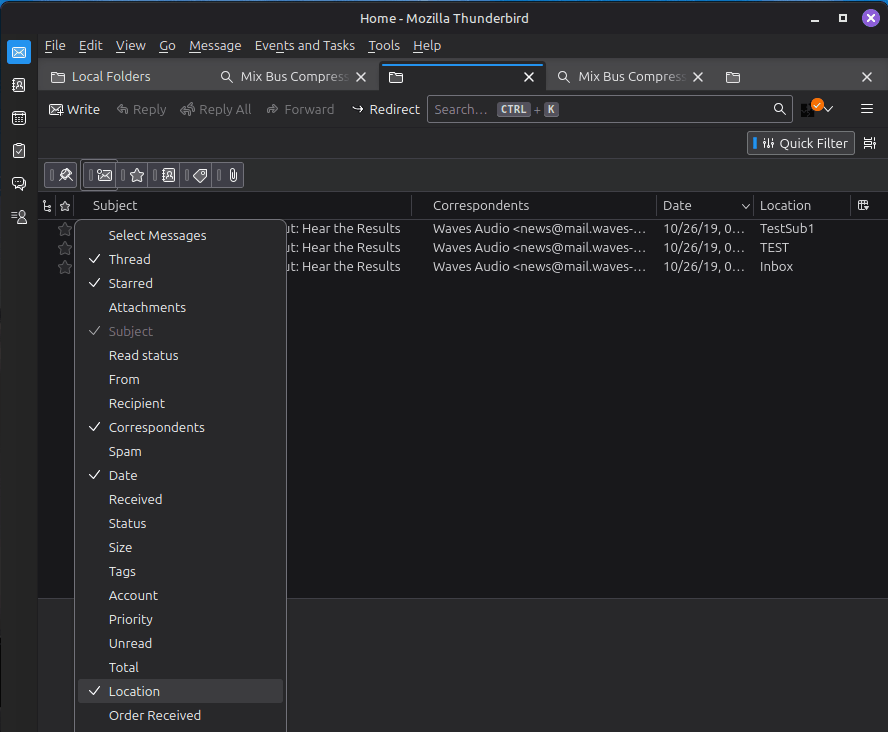
Also, when you use Thunderbird's search feature, if it finds something, it tells you its location. If the search results window doesn't show that column header, you can add it by right-clicking on the column headers row. See attached image.
Geändert am von Lin
Ausgewählte Lösung
Thunderbird on my laptop is a flatpak installation, which might be why the profile location is not listed on the Troubleshoot page. Unfortunately flatpak is not as completely integrated into the OS like debian installs, but was preinstalled with the OS and not my choice. After hunting around, I found the profile under "Home/.var/app/org.Mozilla.Thunderbird/.thunderbird". I did not find my "Business" folder in the collection of other mail folders. However, I did a search as you suggested and it was listed under another mail folder. When I checked Thunderbird, it seems I had inadvertently moused the folder into another one as a sub-folder. So, I simply drag-and-dropped it back to its proper location. When I originally checked for that possibility I missed it for some reason. Dummy me. The message that probably originally told me that came and went so quickly that I couldn't read it. Thanks for your help!