


import of *.ics is extremely slow. The received data cannot be edited in Thunderbird.

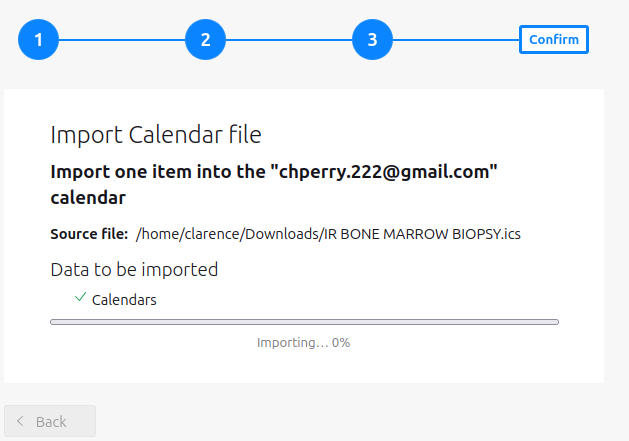
How do I import *.ICS file in a reasonable amount of time. I have appointments in an ics file of less than 1 K in size, typically 700 - 800 bytes in size and they take HOURS to import and do not connect properly then to allow editing the appointment. This is from Baylor Scott and White, a major hospital system in Texas. If there is a problem with the imported file structure, please point me to the correct file structure. I like Thunderbird, but this part of the calendar is very frustrating. Clarence
Alle Antworten (3)
generally ICS files arrive in an email attachment and Thunderbird offers to add them to your calendar. You however appear to be using file import to import individual ICS files. Are you getting these somehow other than in an email?
Today I found this in my personal message on the site after not checking them for months. <<<<<<<<<<<<<<<<<<<<<<<<<<<<<<<<<<,>>>>>>>>>>>>>>>>>>>>>>>>>>>>>>>>>>>>>>>>>>>>>
Clarence Perry 2/22/26, 2:10 PM Slow *.ICS file import. My files are a direct download to the downloads dir. There seem to be 2 ways to start a download. 1) from the downloads directory 2) from within Thunderbird I cannot say that I have noticed any difference in the import process. Since I left the message I tried the same process with Gmail and my files take the "blink of an eye" to load, which you would expect with such small files. One caveat on loading to gmail requires deleting one parameter from within the file. I tend to think there is a problem with expected file format vs. actual file format.
Have you resolved the issue?

I have a similar problem. with TB150.0.1 and win 11 pro. The files come as direct downloads from "mychart" medical program by Epic. I had a similar problem in Win 10. I have two different google calendars which are sync correctly with TB.
The files from MyChart download and open in TB in an import window. The title of the appointment is heavily truncated. There are usually notes attached. I select one of the google calendars already syncing between TB and google. Import sticks at 0% for as long as I have patience. The appointment does not appear in TB.
If I close TB and reopen it, the appointment appears as a tentative appointment. The title needs to be edited but the whole file once it is in the calendar cannot be edited.
I need to edit the title because the import is heavily truncated. Like "New Evaluation PT" will say "New Evaluation"