


I generally view my email folders in a 'Unified Folders' list but one of my main folders has appeared within another folder

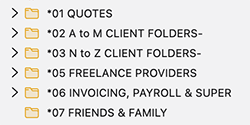
I've attached a screen shot of the main folders seen when I view these as 'Unified Folders' with folders names starting with *01, *02, *03 etc. Somehow, *04 is no longer appearing in this list and has instead appeared inside the *03 folder as seen in my second screen shot. I don't know how this folder and the many sub-folders it contains was moved into the *03 folder and no matter what I do, I can't move the *04 folder out of the *03 folder to sit where it should between folders *03 and *04. Can anyone point me in the right direction to move the *04 folder into the desired location? Thanks in advance, SteveJ

Ausgewählte Lösung
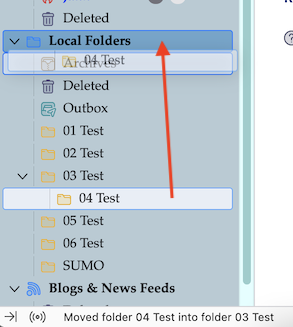
I tested your issue in my Local Folders. The simplest way to move the sub-folder *04 from *03 back to its ancient position is a drag & drop action on the Local Folders name (see image). After the drop on Local Folders the folder *04 will automatically be inserted between folders *03 and *05. It works for me whether I do this drag & drop operation in All Folders or Unified Folders view. One can also try to drag folder *03 directly to its ancient position but this is a very tedious operation with a high failure rate.
Diese Antwort im Kontext lesen 👍 0Alle Antworten (2)
Ausgewählte Lösung
I tested your issue in my Local Folders. The simplest way to move the sub-folder *04 from *03 back to its ancient position is a drag & drop action on the Local Folders name (see image). After the drop on Local Folders the folder *04 will automatically be inserted between folders *03 and *05. It works for me whether I do this drag & drop operation in All Folders or Unified Folders view. One can also try to drag folder *03 directly to its ancient position but this is a very tedious operation with a high failure rate.
Thanks Mapenzi, I tried doing this in the 'Unified Folders' area and it didn't work but in the 'All Folders' area it worked when I dragged the folder into the 'Inbox'. Steve J
Geändert am von steve293