


Windows 10 reached EOS (end of support) on October 14, 2025. For more information, see this article.

Hilfe durchsuchen

Vorsicht vor Support-Betrug: Wir fordern Sie niemals auf, eine Telefonnummer anzurufen, eine SMS an eine Telefonnummer zu senden oder persönliche Daten preiszugeben. Bitte melden Sie verdächtige Aktivitäten über die Funktion „Missbrauch melden“.

Weitere Informationen

Meeting Invites Recently Are Not Converting Time Correctly

Weitere Optionen

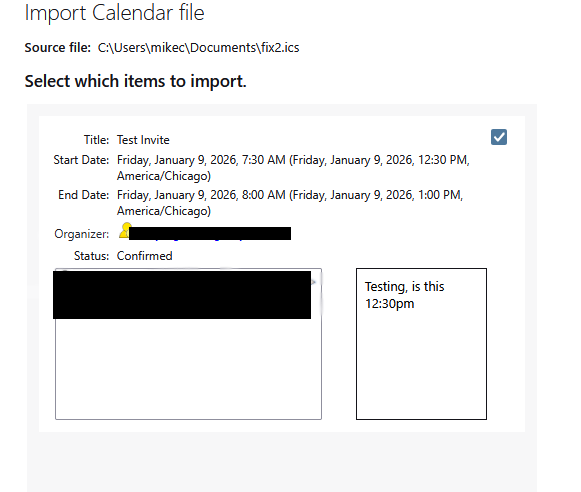
In the past week or so (since the holidays, perhaps), meeting invites I am getting are not converting the time correctly. I can make it work by manually editing the ics file and changing the first TZID from America/Chicago to US/Central I. The screen SHOWS the correct time (image atached) , but it imports as it the time was UTC

If the DTSTART and DTEND are set to US/Central it doesn't work. The issue is it would seem that the user is creating these with the webmail version of Rackspace email, which he has done for YEARS with no issue. Did something change as of recent that would make this format no longer work?

I have to export every one of his meeting invites (and several other people not using rackspace) and make that change at the top to make this import correctly.


BEGIN:VCALENDAR PRODID:-//Webmail//emailsrvr.com calendar//EN VERSION:2.0 CALSCALE:GREGORIAN METHOD:REQUEST BEGIN:VTIMEZONE TZID:US/Central BEGIN:DAYLIGHT TZNAME:CDT DTSTART:20260308T020000 TZOFFSETFROM:-0600 TZOFFSETTO:-0500 RRULE:FREQ=YEARLY;INTERVAL=1;BYDAY=2SU;BYMONTH=3 END:DAYLIGHT BEGIN:STANDARD TZNAME:CST DTSTART:20261101T020000 TZOFFSETFROM:-0500 TZOFFSETTO:-0600 RRULE:FREQ=YEARLY;INTERVAL=1;BYDAY=1SU;BYMONTH=11 END:STANDARD END:VTIMEZONE BEGIN:VEVENT UID:6c27a39585ce5041bc8d09d947515f48f3366ce5 DTSTART;TZID=America/Chicago:20260109T123000 DTEND;TZID=America/Chicago:20260109T130000 DTSTAMP:20260108T115204Z CREATED:20260108T115203Z LAST-MODIFIED:20260108T115203Z ORGANIZER:MAILTO:REDACTED ATTENDEE;PARTSTAT=WAITING;CN=Mike Chytracek;CUTYPE=INDIVIDUAL;ROLE=OPT-PART

ICIPANT;RSVP=TRUE;X-NUM-GUESTS=2:MAILTO:REDACTED

SUMMARY:Test Invite DESCRIPTION:Testing\, is this 12:30pm CLASS:PUBLIC STATUS:CONFIRMED TRANSP:OPAQUE END:VEVENT END:VCALENDAR

In the past week or so (since the holidays, perhaps), meeting invites I am getting are not converting the time correctly. I can make it work by manually editing the ics file and changing the first TZID from America/Chicago to US/Central I. The screen SHOWS the correct time (image atached) , but it imports as it the time was UTC If the DTSTART and DTEND are set to US/Central it doesn't work. The issue is it would seem that the user is creating these with the webmail version of Rackspace email, which he has done for YEARS with no issue. Did something change as of recent that would make this format no longer work? I have to export every one of his meeting invites (and several other people not using rackspace) and make that change at the top to make this import correctly. BEGIN:VCALENDAR PRODID:-//Webmail//emailsrvr.com calendar//EN VERSION:2.0 CALSCALE:GREGORIAN METHOD:REQUEST BEGIN:VTIMEZONE TZID:US/Central BEGIN:DAYLIGHT TZNAME:CDT DTSTART:20260308T020000 TZOFFSETFROM:-0600 TZOFFSETTO:-0500 RRULE:FREQ=YEARLY;INTERVAL=1;BYDAY=2SU;BYMONTH=3 END:DAYLIGHT BEGIN:STANDARD TZNAME:CST DTSTART:20261101T020000 TZOFFSETFROM:-0500 TZOFFSETTO:-0600 RRULE:FREQ=YEARLY;INTERVAL=1;BYDAY=1SU;BYMONTH=11 END:STANDARD END:VTIMEZONE BEGIN:VEVENT UID:6c27a39585ce5041bc8d09d947515f48f3366ce5 DTSTART;TZID=America/Chicago:20260109T123000 DTEND;TZID=America/Chicago:20260109T130000 DTSTAMP:20260108T115204Z CREATED:20260108T115203Z LAST-MODIFIED:20260108T115203Z ORGANIZER:MAILTO:REDACTED ATTENDEE;PARTSTAT=WAITING;CN=Mike Chytracek;CUTYPE=INDIVIDUAL;ROLE=OPT-PART ICIPANT;RSVP=TRUE;X-NUM-GUESTS=2:MAILTO:REDACTED SUMMARY:Test Invite DESCRIPTION:Testing\, is this 12:30pm CLASS:PUBLIC STATUS:CONFIRMED TRANSP:OPAQUE END:VEVENT END:VCALENDAR

Alle Antworten (1)

Weitere Optionen

Image of imported ics showing the time correctly, but it doesn't create the event properly.
Stellen Sie eine Frage

Sie müssen sich mit Ihrem Benutzerkonto anmelden, um auf Beiträge zu antworten. Bitte stellen Sie eine neue Frage, wenn Sie noch kein Benutzerkonto haben.