


How to remove tne chat?
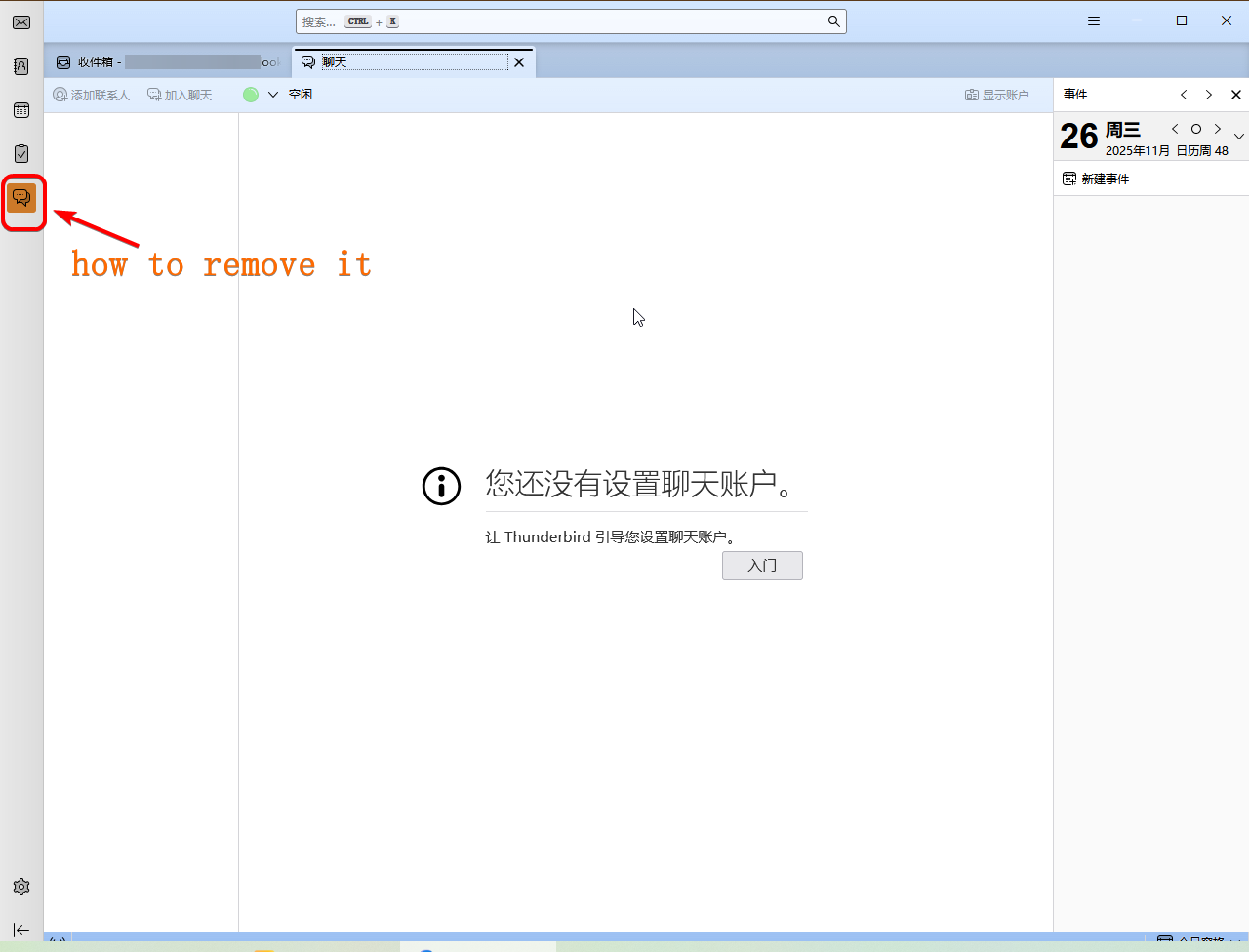
The chat feature is useless to me. Could you please remove or disable the button shown in the image? Thank you.
Ausgewählte Lösung
Add this to userChrome.css:
#chatButton{display: none}
Help/Troubleshooting Info, Profile Folder, Open Folder, close TB, create a new folder named chrome, create a new document in chrome with a text editor, name it userChrome.css, Save as type: All files *.*, copy in the above code. Double-click toolkit.legacyUserProfileCustomizations.stylesheets to true in Settings/General/Config. editor, restart TB.
video: How to create a css file (Firefox or TB)
Diese Antwort im Kontext lesen 👍 1Alle Antworten (2)
CarlW 说
The chat feature is useless to me. Could you please remove or disable the button shown in the image? Thank you.
I am using the latest version of Thunderbird (Windows 10 145.0 64-bit).
Ausgewählte Lösung
Add this to userChrome.css:
#chatButton{display: none}
Help/Troubleshooting Info, Profile Folder, Open Folder, close TB, create a new folder named chrome, create a new document in chrome with a text editor, name it userChrome.css, Save as type: All files *.*, copy in the above code. Double-click toolkit.legacyUserProfileCustomizations.stylesheets to true in Settings/General/Config. editor, restart TB.