


Windows 10 reached EOS (end of support) on October 14, 2025. If you are on Windows 10, see this article.

Hilfe durchsuchen

Vorsicht vor Support-Betrug: Wir fordern Sie niemals auf, eine Telefonnummer anzurufen, eine SMS an eine Telefonnummer zu senden oder persönliche Daten preiszugeben. Bitte melden Sie verdächtige Aktivitäten über die Funktion „Missbrauch melden“.

Weitere Informationen

How to show a list of only the Inboxes as in Favoutites in Outlook MS standalone app

  • 2 Antworten
  • 0 haben dieses Problem
  • 125 Aufrufe
  • Letzte Antwort von Dr.Watson
  • Gelöst

How can I duplicate below in TB / BetterBird ?

We all know and see from left side of TB / BettreBird open app screen is the list of email accounts one has. In Outlook 2016 and onwards one can add just the Inbox of each mail account I have to a list called 'Favourites' and this resides above all the mail accounts and displays as a list of all the 'Inboxes' only. This means I just have to click on each respective inbox an it displays just that....all the mails in the Inbox. Currently I just have the list of account names where, when a mail is received and the corresponding circled number of mails shown I have to open the account to see the drop down then select the Inbox to get to the list of emails.

I am sure I am missing the solution.

Thanks for assistance.
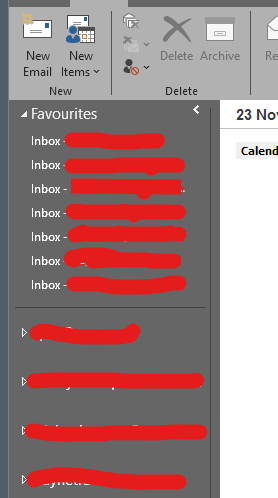
How can I duplicate below in TB / BetterBird ? We all know and see from left side of TB / BettreBird open app screen is the list of email accounts one has. In Outlook 2016 and onwards one can add just the Inbox of each mail account I have to a list called 'Favourites' and this resides above all the mail accounts and displays as a list of all the 'Inboxes' only. This means I just have to click on each respective inbox an it displays just that....all the mails in the Inbox. Currently I just have the list of account names where, when a mail is received and the corresponding circled number of mails shown I have to open the account to see the drop down then select the Inbox to get to the list of emails. I am sure I am missing the solution. Thanks for assistance.
Angefügte Screenshots

Ausgewählte Lösung

Thanks , will give it a go.

Diese Antwort im Kontext lesen 👍 0

Alle Antworten (2)

The following methods might be helpful:

Method A: Using Favorite Folders:

Step 1: Right-click a folder on the Folder Pane. > Tick "Favorite Folder".

Step 2: (In menu bar) "View" > "Folders" > Tick "Favorite Folders".

---

Method B: Using Unified Folders:

(In menu bar) "View" > "Folders" > Tick "Unified Folders".

Ausgewählte Lösung

Thanks , will give it a go.

Stellen Sie eine Frage

Sie müssen sich mit Ihrem Benutzerkonto anmelden, um auf Beiträge zu antworten. Bitte stellen Sie eine neue Frage, wenn Sie noch kein Benutzerkonto haben.