


Thunderbird display
A new hard drive was installed last week. Then had to download and install Thunderbird again. But it looks different. The window is all the incoming list. It used to be divided by the top half showing the list and the bottom half showing whichever message I clicked on. Now I have to double click on the message and it opens a new tab. How do I make it go back to the way it used to display. That was a lot less clunky than opening a new tab. I'm also having trouble finding my calendar and address book. But that's a question for the Geek Squad who told me they backed up all my data.
Ausgewählte Lösung
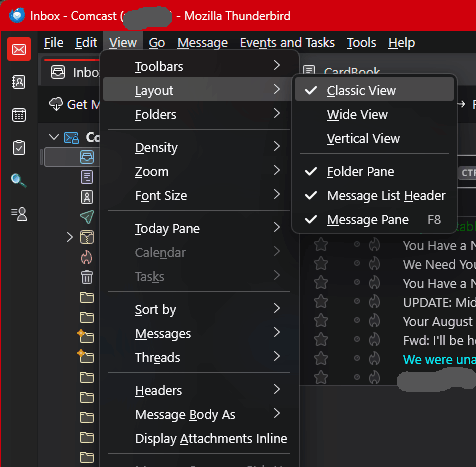
Check out the menu option View | Layout (press Alt if the menu is hidden.) Play with the options there until it looks the way you like.
Diese Antwort im Kontext lesen 👍 0Alle Antworten (2)

Ausgewählte Lösung
Check out the menu option View | Layout (press Alt if the menu is hidden.) Play with the options there until it looks the way you like.
Thank you. It took a couple tries for the Layout options to work, but they finally activated and I found the right one.