


Trash file not compacted in Thnuderbird

Hello, Despite I compacted my folder, the trash file is steel big 27Gb even with empty trash. Version 140.2.0esr 64 on Windows10. I have the same issue on all boxes. How could I delete the trash file. Could I delete it and recreate an empty file ? Thank you Denis
Ausgewählte Lösung
Hi guys, thank you for your answers.
So I have closed Thunderbird and deleted files trash and trash.msf. trash.msf is recreated new at reopenning Thunderbird.
by the way on some boxes I have a file trash on some I have in addition an empty directory trash.sdb ! that's it !
To summerize. In help it is said, you may compact regularly because trash is not cleaned even if you delete the mail in. But the file trash itself is not affected by compacting and needs to be deleted manually.
So problem solved. thank you Denis
Diese Antwort im Kontext lesen 👍 0Alle Antworten (7)
I suggest you do this:
- click help>troubleshootinginformation
- scroll down to 'profile folder' and click 'open folder'
- if the account is IMAP, click the imapmail folder and then the <imap-account> folder. If POP, click the Mail folder and then the <pop-account> folder
- now, click the trash folder and do a screenshot of the contents and post that.
Thank you David. I forgot to say I'm using imap. I can't edit a so big file I tried with a smaller one (6Gb) in an other box but still not possible (with PSpad) Hereby the screenshot from the folder of one box.
thank you for helping. Denis
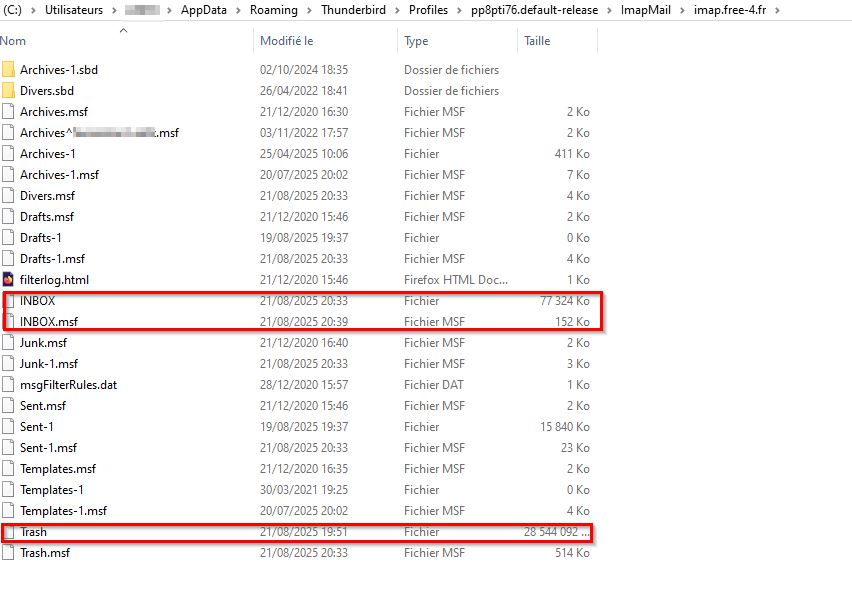
Click the trash folder to open it. you can then delete the entries with windows file explorer.
On second thought, the trash folder itself may be corrupt. Exit thunderbird first and then delete the trash and trash.msf in the profile. to do that - click help>troubleshootinginformation - scroll down to 'profile folder' and click 'open folder' - exit thunderbird - click to the imapmail\<accountname> folder and delete trash and trash.msf - restart thunderbird

Hi Denis. Did you explicitly empty the trash or only compact it?
Ausgewählte Lösung
Hi guys, thank you for your answers.
So I have closed Thunderbird and deleted files trash and trash.msf. trash.msf is recreated new at reopenning Thunderbird.
by the way on some boxes I have a file trash on some I have in addition an empty directory trash.sdb ! that's it !
To summerize. In help it is said, you may compact regularly because trash is not cleaned even if you delete the mail in. But the file trash itself is not affected by compacting and needs to be deleted manually.
So problem solved. thank you Denis
Yes, but the “empty trash” command works in Thunderbird. You do not have to delete files in the file system.